
Looking for a reliable way to keep your vehicle’s battery healthy and ready to start when you need it?

Quick verdict
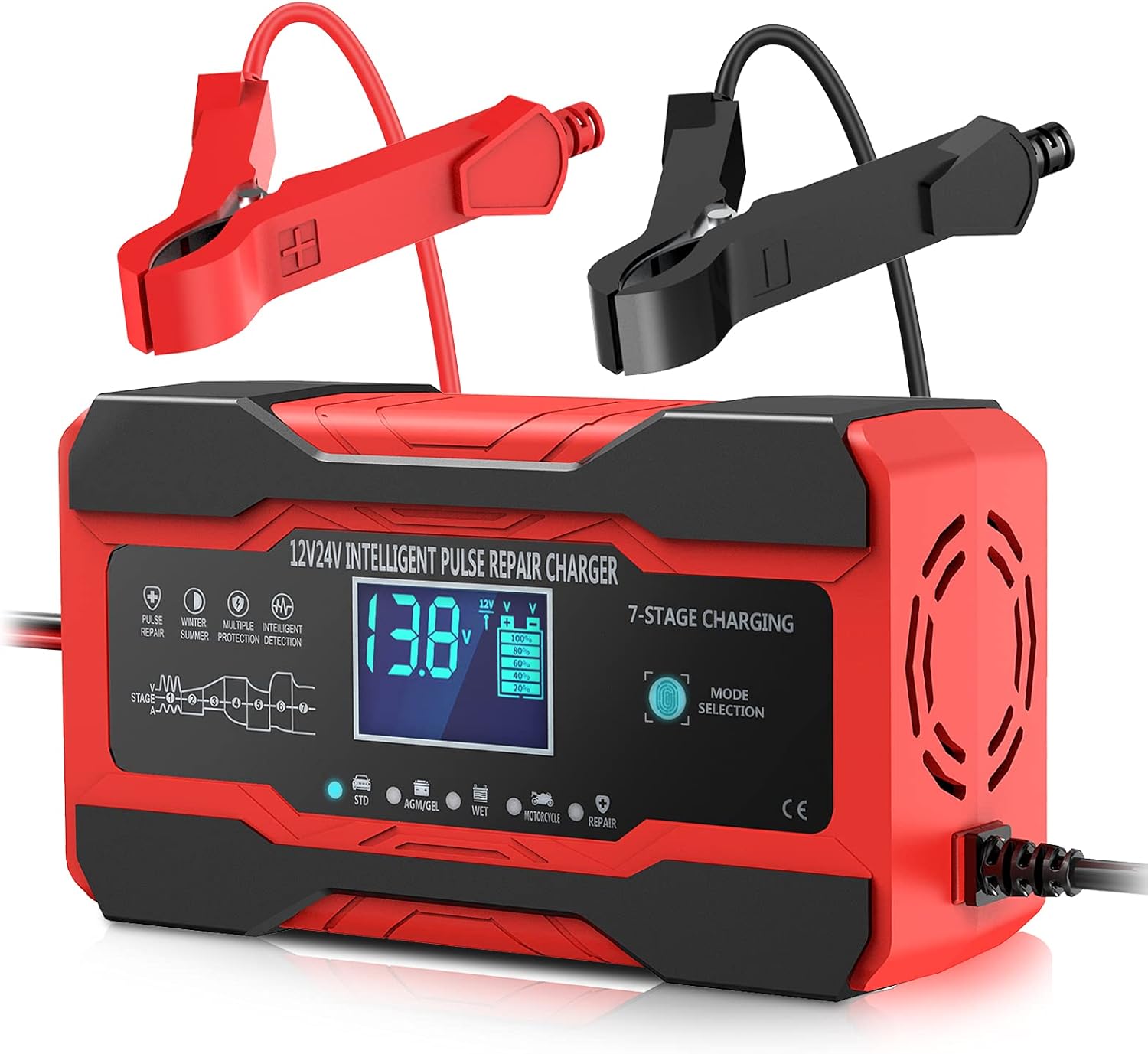
You’ll find the YONHAN Battery Charger 10-Amp 12V and 24V Fully-Automatic Smart Car Battery Charger, Battery Maintainer Trickle Charger, and Battery Desulfator with Temperature Compensation is a compact, feature-packed unit that aims to be an all-in-one solution. It’s built to charge, maintain, trickle charge, and attempt battery desulfation across a wide range of lead-acid battery types, so you can keep your car, truck, motorcycle, lawnmower, or boat battery in good shape without buying multiple devices.
What this charger is best at
This charger really shines when you need a single device to handle everyday charging, long-term maintenance, and occasional battery repair attempts. You’ll appreciate the temperature compensation, clear backlit LCD readout, and multiple modes that let you tailor charging for cold winters or hot summers.
Product overview and main specs
Below is a compact breakdown that puts the most important specs and capabilities in front of you so you can quickly see whether this unit fits your needs. You’ll get a quick sense of its power, compatibility, and special features.
| Item | Specification | What it means for you |
|---|---|---|
| Model | YONHAN 10-Amp 12V/24V Smart Charger | Single unit for both car and truck batteries |
| Charging Current | 10 A (max) | Faster charge than small trickle chargers; good for mid-size batteries |
| Voltage | 12 V and 24 V | Works on most passenger cars, trucks, motorcycles, boats with lead-acid batteries |
| Battery Types | AGM, GEL, SLA, Flooded (lead-acid) | Covers common battery chemistries except lithium |
| Modes | Charging, Maintainer, Trickle (Motorcycle), Repair/Desulfation, Winter/Summer | Versatile for different climates and battery conditions |
| Display | Backlit LCD (voltage, current, power %, temperature, mode) | Easy to monitor battery health and charging progress |
| Sensors | Thermal sensor for temperature compensation | Prevents over/undercharging due to temperature changes |
| Safety | Reverse polarity, overcharge, short-circuit protection | Safer charging and less worry about damage |
| Cable length | Input 90 cm, Output 65 cm | Modest length; may need extension for some setups |
| Limitations | Cannot charge lithium, cannot charge below 0.3 V, not for physically damaged batteries | Know your battery’s state before using |

Charging modes and what you should know
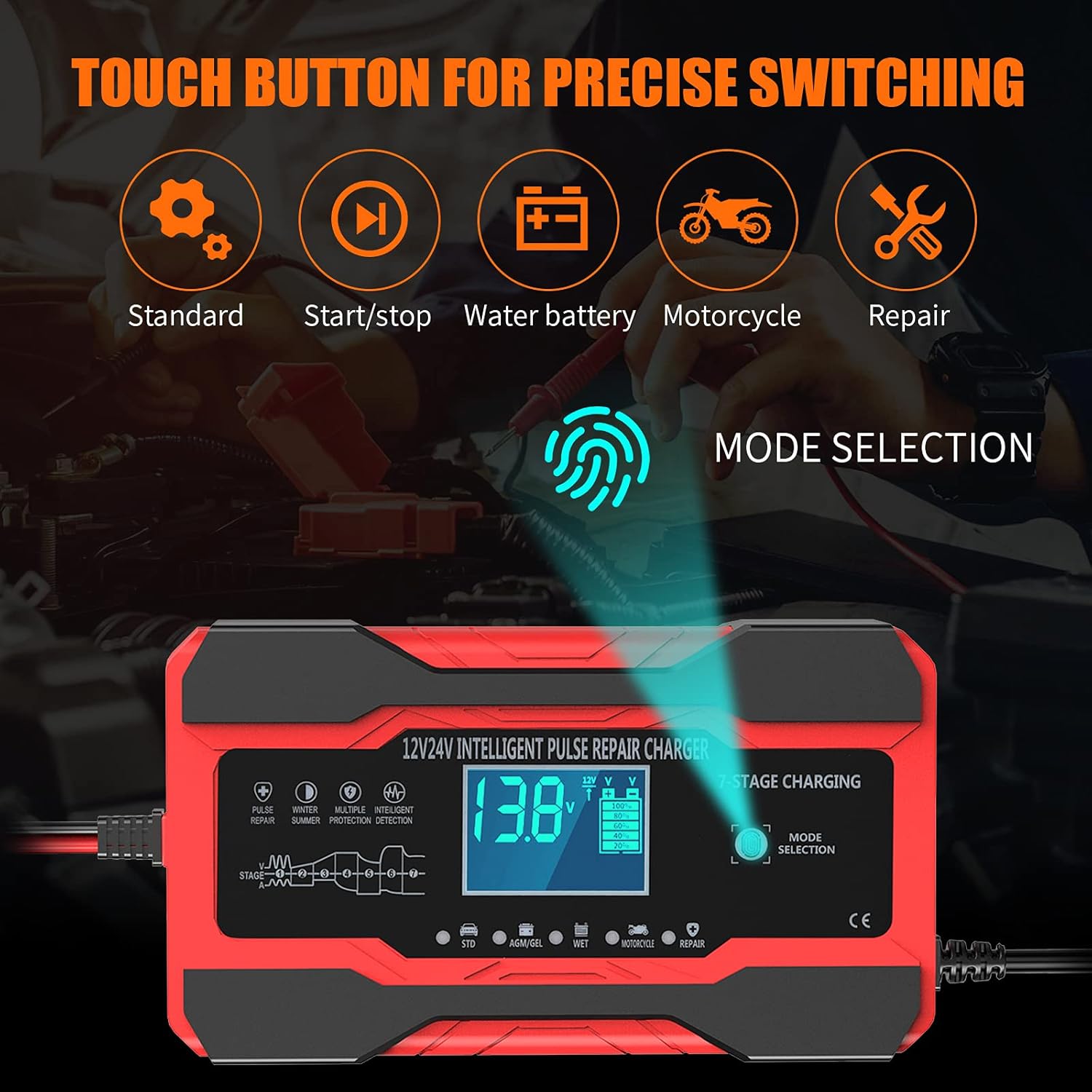
You’ll see multiple charging modes available on the YONHAN charger: standard charge, maintainer/trickle modes, repair/desulfation, and seasonal settings for winter and summer. Each mode is meant to address a different situation — a rapid or standard charge, keeping a battery topped up while in storage, attempting to restore a neglected battery, or adjusting behavior for temperature extremes.
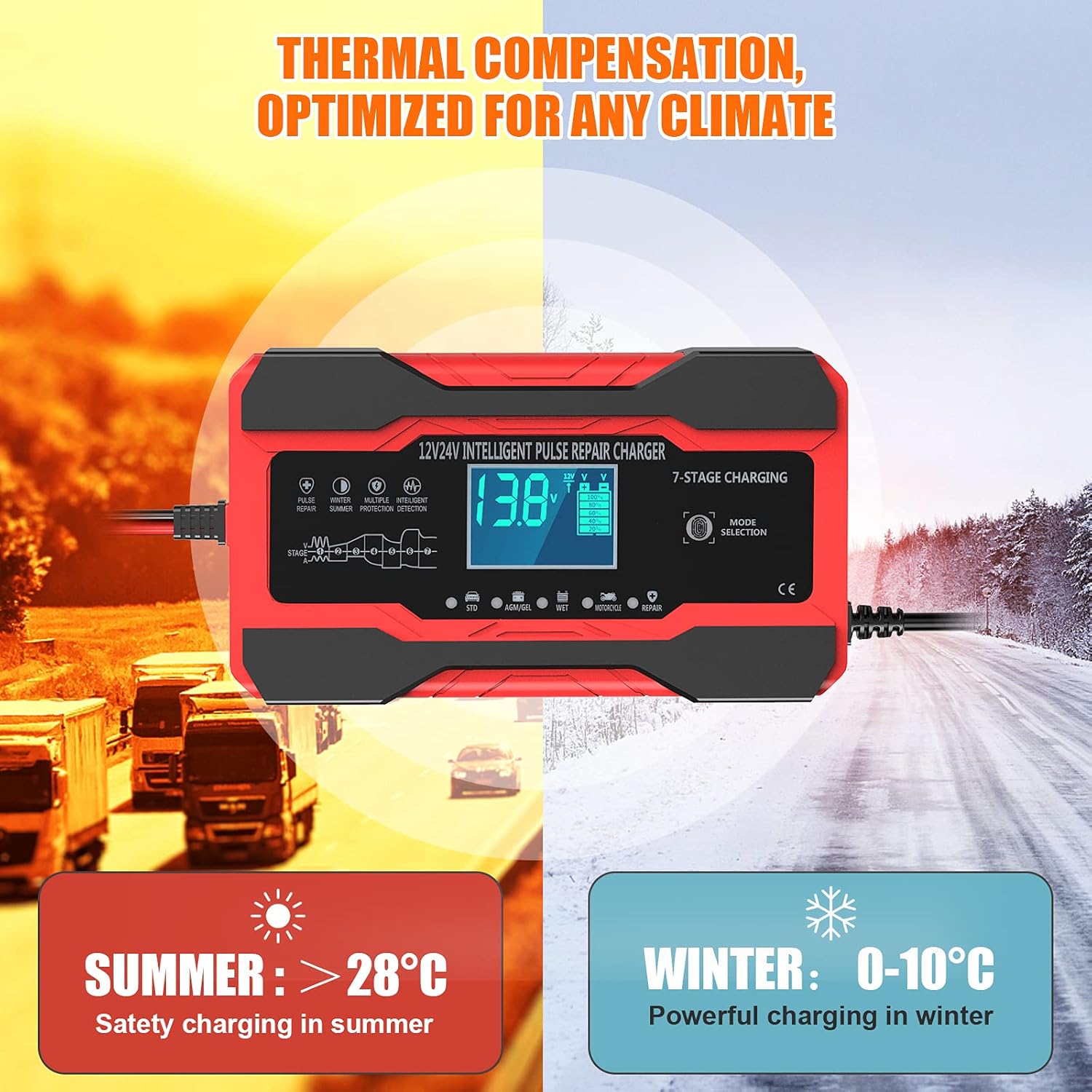
The winter and summer modes are particularly useful if you live somewhere with pronounced seasonal temperature swings. In winter, the charger will adjust output so the battery doesn’t starve of charge, and in summer it will reduce the risk of overcharging when the battery and ambient temperature are higher.
Battery compatibility and what that means for you
You can use this charger with most common lead-acid batteries: AGM, GEL, SLA, and flooded-cell batteries. That covers nearly every conventional automotive and powersport battery you’re likely to encounter, so you won’t need separate chargers for different battery types.
Do note that lithium batteries are explicitly excluded, and the charger won’t be effective if your battery’s voltage is below 0.3 V or if the battery is physically damaged. Always check your battery type and voltage before connecting the unit to avoid wasted time or potential damage.
Safety features you’ll appreciate
Safety is built into the device with protections against reverse polarity, overcharging, and short circuits. You’ll appreciate the automatic safeguards if you accidentally clip the clamps the wrong way or leave the charger connected for a long period.
The charger’s memory of the last selected mode after power outages is another convenience that reduces the chance of accidentally leaving it in an inappropriate mode. The thermal sensor also helps you avoid aggressive charging when the battery is hot and compensates for cold conditions.
Display and monitoring: know what’s going on
The backlit LCD gives you clear real-time information: battery voltage, charging current, percentage of charge, temperature, and the active mode. You’ll be able to check battery health at a glance and make decisions without guessing what’s happening inside the battery.
Because the unit shows temperature and includes a thermal sensor, you’ll know when the charger is compensating for ambient temperature. This is useful for winter charging where battery performance is temperature-dependent.
Repair mode and desulfation: reasonable expectations
The repair or desulfation mode uses high and low-frequency pulse technology designed to remove sulfate buildup on battery plates and to restore some life to neglected batteries. If your battery won’t accept a normal charge because of sulfation, this mode may bring it back to usable condition and extend its life.
However, don’t expect miracles: the charger won’t revive batteries that are completely dead, below 0.3 V, ruptured, or physically damaged. Repair mode is for lightly to moderately sulfated batteries that still hold some voltage but struggle to recharge normally.
How the charger handles cold weather
You’ll find the winter mode and temperature compensation helpful if you need to keep a battery healthy in freezing weather. Cold reduces battery capacity and increases the current required to start an engine, so the charger’s adaptations can prevent undercharging.
Because the unit adapts to temperature, you’ll be less likely to return to a vehicle with a dead battery after a cold night. Still, if a battery is already very weak or old, cold weather may still leave it marginal.
Trickle charging and long-term maintenance
If you plan to store a vehicle for weeks or months, you can switch the device to trickle or motorcycle mode after a full charge. This mode is compatible with the voltage monitoring feature that keeps battery voltage around 12 V so the battery stays topped up without overcharging.
You can leave the charger connected for long periods in maintainer mode, which is ideal for seasonal storage of motorcycles, classic cars, or boats. The backlit LCD helps you keep an eye on battery status so you’ll know if something changes.
Practical charging times and what to expect
Charging time depends on battery capacity and state of charge. At a 10 A maximum output, a typical 50 Ah battery that’s half-depleted could move toward full charge within a few hours under good conditions, while deep discharge will take longer and may require the repair mode first.
Because the charger adjusts output and includes maintenance modes, you’ll often see faster recovery for moderately drained batteries and gentler charging as the battery nears full. If you need rapid jump-start-level current, you’ll still need a dedicated starter pack rather than this charger.
How to use the YONHAN charger (step-by-step)
Follow these steps and you’ll minimize mistakes and get the best performance. You’ll be able to charge, maintain, or attempt desulfation safely.
- Inspect the battery and terminals for corrosion, damage, or cracked cases. Cleaning terminals and ensuring they’re tight will help the charger make a proper connection.
- Check battery voltage before connecting; remember the unit won’t charge below 0.3 V. If the battery is below that threshold, it’s likely beyond the charger’s recovery ability.
- Select the correct voltage (12 V or 24 V) and battery type on the charger to match your battery. Choosing the wrong setting can lead to improper charging.
- Connect clamps: red to positive (+) and black to negative (−). For vehicles with sensitive electronics, connect the negative clamp to a chassis ground if recommended by the manufacturer.
- Power the unit and monitor the LCD for voltage, current, and mode confirmation. The charger will begin an automated program or follow the repair/trickle mode if you selected it.
- After charging completes, switch to maintainer or motorcycle/trickle mode if you plan to leave the battery connected long-term. This is how you keep the battery topped off without overcharging.
Preparing your battery — checks you shouldn’t skip
You should always check for corrosion, loose clamps, and cracked battery cases before charging. Dirty terminals and loose clamps can cause poor contact and a failure to charge, or even display the “no battery detected” indicator on the unit.
If you see heavy corrosion, clean the terminals with an appropriate cleaner or a mixture of baking soda and water, then dry thoroughly. Confirm the battery type and voltage before proceeding to make sure the charger is set correctly.
Selecting the right mode for your situation
If you just need a regular charge, use the standard charging mode for 12 V or 24 V depending on your battery. For long-term storage, switch to maintainer or motorcycle/trickle mode after a full charge to preserve battery health.
If the battery won’t accept a normal charge, try the repair/desulfation mode, but watch the LCD and the battery’s voltage response to evaluate progress. If the battery remains below expected voltages after repeated attempts, consider replacement.
Connecting and starting charge safely
Always connect the clamps in the order recommended: positive first, then negative. For vehicles with sensitive electronics, attaching the negative clamp to chassis ground can reduce the risk of sparks near the battery.
After powering up the charger, keep an eye on the LCD and the safety indicators. If the battery is not detected or the icon flashes empty, stop and check connections and terminal cleanliness before continuing.

Switching to trickle/maintainer mode
When the battery reaches a full charge, select motorcycle mode if you want a low-current trickle and voltage monitoring to keep the battery at or above 12 V. This mode is helpful when you plan to leave your vehicle unused for an extended period.
You can leave the charger connected in maintainer mode to keep the battery healthy, but check the display occasionally to confirm everything is operating as expected.
Using repair mode correctly and safely
Use repair/desulfation mode only for batteries that still show voltage and are not physically damaged. This mode applies pulse technology to reduce sulfate accumulation and can restore some lost capacity.
If the battery shows zero volts or below 0.3 V, the charger won’t be able to initiate repair; you’ll need a specialized charger or battery replacement. When using repair mode, leave the charger connected under supervision and check the progress on the display.
Troubleshooting common issues
If the charger shows “no battery detected” or the battery icon flashes empty, check the clamps, terminal cleanliness, and cable connections first. Clean any corrosion and ensure a firm connection, then retry the charger.
If the power plug isn’t making contact, dirt on the battery terminals or loose clamps may be the cause, or the clamp size might not fit well. Clean and tighten the connections, and consider alternatives if the clamp size isn’t appropriate.
What to do if the battery won’t charge
If charging doesn’t start even after cleaning connections and verifying voltage, check if the battery voltage is below 0.3 V or if the battery is damaged. The charger cannot revive completely dead or physically damaged batteries.
If the battery voltage is above the threshold and still won’t charge, try repair mode. If that doesn’t help after multiple cycles, plan for a replacement; the battery may have reached the end of its useful life.
Cable length and placement considerations
The charger comes with an input line of about 90 cm and an output line of about 65 cm, which is usually sufficient for standard garage setups. If you often charge batteries in less accessible locations or larger vehicles, you may need an extension or to reposition the charger.
Always avoid placing the charger where it could get wet or where cables could be pinched. Keep cords away from hot engine parts and sharp edges.
Real-world performance: what users typically report
In everyday use, you’ll notice the charger handles routine charging and maintenance well and the LCD makes monitoring straightforward. Users often appreciate the temperature compensation and the automatic mode memory for convenience.
Repair mode results vary: some users report noticeable recovery of lightly sulfated batteries, while heavily sulfated or physically degraded batteries show minimal improvement. The charger’s safety features and stable maintenance mode are frequently praised for long-term storage use.
Comparing the YONHAN charger to common alternatives
Compared with basic trickle chargers, you’ll get faster charging, more features, and smarter control with the YONHAN unit. Compared with high-end professional chargers, you may miss advanced diagnostics or higher current outputs, but the YONHAN balances cost and capability for most consumer use cases.
If you need lithium charging or extremely fast top-ups for large commercial batteries, this unit isn’t the right tool. For everyday automotive and powersport battery care, it’s a practical and versatile choice.
Pros and cons — a balanced look
You’ll like the charger for its multifunction capability, temperature compensation, and user-friendly LCD that shows key battery metrics. The repair/desulfation and maintainer modes make it useful for seasonal storage and battery recovery attempts.
On the downside, you can’t use it on lithium batteries, it won’t charge batteries below 0.3 V, and the cable lengths are modest, which may require repositioning or extensions. Also, while repair mode is helpful, it won’t bring back batteries that are severely damaged or completely dead.
Who should buy the YONHAN charger
You should consider this charger if you own multiple types of vehicles or equipment with lead-acid batteries and want a single device to handle charging, maintenance, and occasional repair. It’s especially useful for people who store motorcycles, boats, or classic cars and need temperature-aware maintenance.
If you want a charger that’s easy to read and adapts to cold and hot conditions, this unit will fit your needs. It’s also good if you want a smarter alternative to a simple trickle charger without paying for top-tier professional gear.
Who should look elsewhere
If you rely exclusively on lithium batteries or need to charge batteries that are completely dead (below 0.3 V), this charger is not suitable. Likewise, if you need very high-current charging for commercial or heavy-duty batteries, you’ll want a higher-capacity, professional-grade charger.
If you frequently need longer cable runs without extension accessories, the modest wire lengths may be inconvenient and you might prefer a unit designed with longer leads.
Maintenance and care tips
To keep the unit working reliably, store it in a dry place away from temperature extremes and moisture when not in use. Clean the clamps and battery terminals before charging to ensure consistent performance, and avoid using it on damaged batteries.
Periodically check the cords and connectors for wear and replace or repair them if you see damage. If the display shows abnormal readings or the unit behaves unpredictably, stop using it and consult the manual or seller support.
Common FAQs you’ll want answers to
Q: Can this charger charge lithium batteries?
A: No. The charger is intended for lead-acid batteries only, including AGM, GEL, SLA, and flooded batteries. Charging lithium batteries with it could be unsafe or ineffective.
Q: Can it revive a completely dead battery?
A: No. The unit cannot charge batteries below 0.3 V or those that are physically damaged. Repair mode can sometimes help with sulfation, but it requires some residual voltage.
Q: Can you leave it connected indefinitely?
A: Yes, when set to maintainer/trickle mode the charger is designed to keep a battery at an appropriate voltage without overcharging. Still, periodically check the display and connections.
Q: What should you do if the LCD shows no battery detected?
A: Clean the battery terminals, ensure clamps are tight, and confirm the battery voltage is above the minimum. Reconnect and retry; if it still fails, the battery may be below the charger’s threshold.
Q: Is it safe to use in wet conditions?
A: Avoid using any battery charger in wet or rainy conditions. Keep the unit dry and protected and do not expose it to the elements to prevent damage or electrical hazards.
Final recommendations
If you need a versatile, user-friendly charger for lead-acid batteries that can charge, maintain, and attempt desulfation, the YONHAN Battery Charger 10-Amp 12V and 24V Fully-Automatic Smart Car Battery Charger, Battery Maintainer Trickle Charger, and Battery Desulfator with Temperature Compensation is worth considering. You’ll gain convenience from its multi-mode operation, temperature compensation, and clear LCD readout, making battery care simpler for most everyday uses.
Before buying, confirm your battery type and voltage, and make sure you’re comfortable with the cable lengths and the charger’s limitations regarding lithium batteries and very low-voltage units. With proper use and maintenance, this charger can be a dependable addition to your garage or storage routine.
Disclosure: As an Amazon Associate, I earn from qualifying purchases.