
Are you looking for a portable power solution that can keep your essentials running during outages, camping, or on the job?

Product Overview
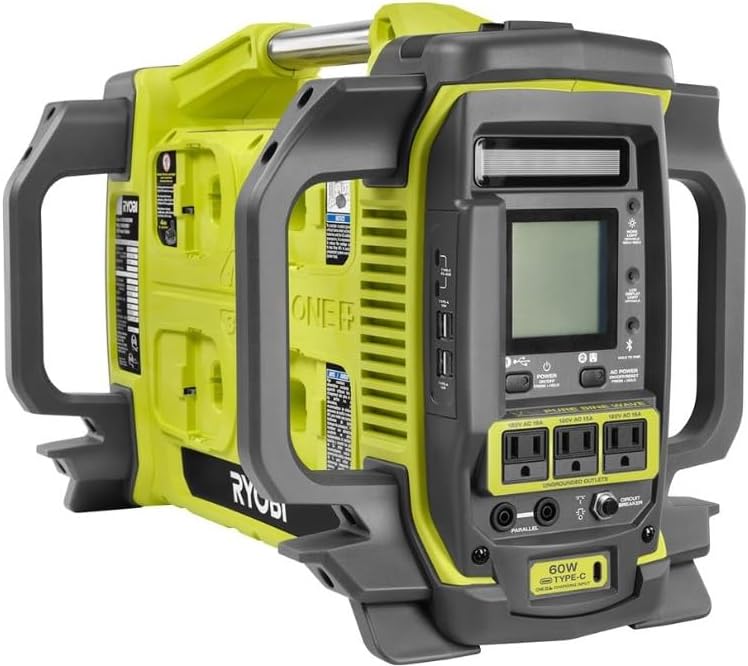
You’ll get a versatile inverter power station when you pick up the RYOBI 1800-Watt Power Station Battery Inverter Push Button Generator/Charger (Tool-Only). This is an inverter-style generator designed to work with RYOBI 18-Volt ONE+ lithium batteries, letting you scale power and runtime by adding more batteries as you need them.
This unit is built to be quiet and emission-free for indoor use, and it converts DC battery energy into clean AC power with pure sine wave output for sensitive electronics. Because it’s sold as a tool-only unit, you’ll need to supply ONE+ batteries — and the runtime and power you experience will depend on the number and capacity of batteries you connect.
What it is
This product is an inverter-based power station that accepts up to eight 18-Volt ONE+ lithium batteries to produce AC power and device charging for a wide range of electronics and appliances. It’s intended as a portable, modular alternative to small gas generators, and it’s optimized for indoor use where zero emissions and quiet operation matter to you.
Because it uses the RYOBI ONE+ battery platform, you can mix and match batteries you already own from that system, or purchase higher-capacity 12Ah batteries to maximize runtime. The unit also includes an adapter to consecutively charge up to eight batteries, and it’s solar-charge capable if you want off-grid recharge options.
Key Specifications
Here’s a quick snapshot of the headline specs so you can understand what the RYOBI 1800-Watt Power Station offers at a glance. These are the core numbers that matter when you’re matching the unit to your needs.
| Specification | Detail |
|---|---|
| Model | RYOBI 1800-Watt Power Station Battery Inverter Push Button Generator/Charger (Tool-Only) |
| Peak (Starting) Watts | 3,000 W |
| Continuous (Running) Watts | 1,800 W |
| Usable Energy (with 8 × 12Ah batteries) | 1,728 Wh (1728 Watt-hours) |
| Battery Compatibility | Up to 8 × 18V ONE+ lithium batteries (12Ah used as example) |
| Single Battery Output Capability | Up to 450 W using a single 18V battery |
| Maximum Output with Batteries | Up to 1,800 W with 4 batteries connected |
| Extended Runtime | Connect up to 8 batteries for extended runtime |
| Inverter Type | Pure sine wave (safe for sensitive electronics) |
| Charging | Consecutive charging of up to 8 batteries with included adapter; solar charging capable |
| Indoor Use | Safe for indoor use (zero emissions, quiet) |
Performance
You should think of this unit as a modular power station where overall performance is a combination of inverter capacity and the batteries you attach. The inverter delivers up to 1,800 watts continuously and can handle 3,000 watts of surge for start-up currents, while battery count and capacity determine how long it will keep running.
Because the inverter is pure sine wave, devices like laptops, modern TVs, sound systems, and medical equipment that prefer clean power will work well. Keep in mind the practical trade-off: higher continuous loads dramatically reduce runtime, so your intended use will determine how many batteries you want to add.
Running & Starting Watts
You can draw up to 1,800 watts continuously when the system is configured with appropriate batteries, which covers many household appliances and a variety of tools for short runs. The 3,000-watt starting surge gives you headroom for devices with high inrush currents, such as refrigerators or power tools that require a momentary surge to start.
If you want to run high-wattage devices, plan for their startup surge and steady-state consumption separately. For example, some compressors and motors draw significantly more current at startup than while running; the 3,000-watt surge helps you manage that, but sustained high draws will still drain the battery bank quickly.
Runtime Examples
You’ll find runtime varies by device power draw and by how many batteries you use. For reference, one 18V 12Ah battery stores roughly 216 Wh (18 V × 12 Ah = 216 Wh), so eight of those give about 1,728 Wh total usable energy. Below are example runtimes using that 1,728 Wh figure and typical device power estimates.
| Device / Load | Typical Power Draw (W) | Estimated Runtime with 8 × 12Ah Batteries (hours) |
|---|---|---|
| Full-size refrigerator (average) | 60 W | ~28.8 hours |
| 55″ LED TV | 120 W | ~14.4 hours |
| Laptop charging | 60 W | ~28.8 hours |
| LED lights, fans, small appliances (combined ~200 W) | 200 W | ~8.6 hours |
| High-draw microwave (1000 W) | 1000 W | ~1.7 hours |
| Running a 450 W device on a single battery | 450 W | ~0.48 hours (≈29 minutes) |
| Running 1,800 W with 4 batteries | 1800 W | ~0.48 hours (≈29 minutes) |
These examples show that for high-wattage needs (like full-time powering of electric heaters, ovens, or continuous power tools), battery consumption is rapid. For lower average loads — like a fridge cycling on and off, lighting, phone charging, and occasional entertainment — the RYOBI system with eight 12Ah batteries can provide meaningful multi-hour to multi-day coverage.

Charging & Recharging
You’ll want to plan how you’ll recharge the batteries once they’re depleted. The RYOBI power station includes a charging adapter that charges batteries consecutively (one after the other), and it also supports solar charging, which adds flexibility when you’re off-grid or dealing with long outages.
Because the charging approach is consecutive rather than parallel, recharging all eight batteries will take more total elapsed time compared with a multi-bay fast charger that charges multiple batteries simultaneously. That trade-off exists because the system focuses on balanced charging while integrated into the power station package.
Charging Batteries with Included Adapter
The included charging adapter lets you plug batteries into the power station and recharge them sequentially, which is convenient because you won’t need a large external charger for each battery. This is especially useful if you have limited space or want a single charging point for your battery bank.
Sequential charging means you should expect overall recharge time for multiple batteries to be the sum of individual battery charge times, so plan accordingly if you’re relying on the system for continuous operation. If you need faster turnaround, consider adding a dedicated multi-bay ONE+ charger or using multiple chargers for parallel charging (if your workflow supports it).
Solar Charging
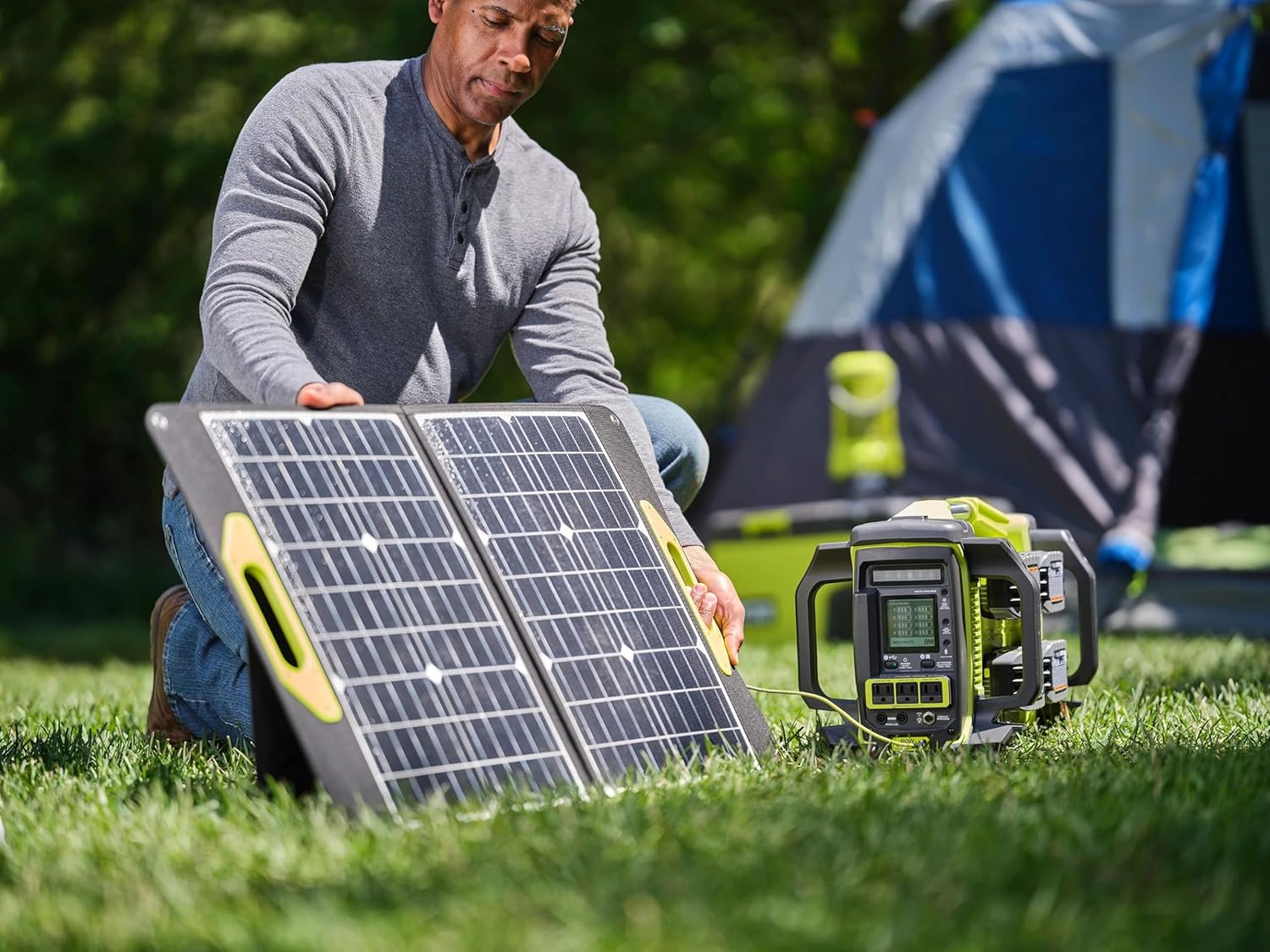
If you want to operate independently of the grid, the RYOBI power station is capable of solar charging, which is handy for camping, remote jobsites, or long-term outage preparedness. You’ll need an appropriate solar panel array and compatible charge controller or adapter to match your solar input to the power station’s solar charging input.
Solar charging rate depends on sunlight conditions and panel wattage; on a sunny day, a larger solar array can meaningfully top up the batteries, but panels sized too small will only slow-charge the bank. If you plan regular solar use, size your panels so they can meaningfully contribute to the daily energy requirement you expect to draw from the station.
Charging Time Examples (Approximate)
You’ll see charging time change based on the current provided to each battery. Because the battery is 12Ah at 18V (216 Wh per battery), here are some approximate per-battery charge times at different charge currents:
- At 1 A charge current: ~12 hours to fully charge from empty.
- At 2 A charge current: ~6 hours to fully charge.
- At 4 A charge current: ~3 hours to fully charge.
Because the included adapter charges batteries consecutively, charging all eight batteries will multiply these per-battery times by eight. For instance, if the adapter charges each battery at 2 A sequentially, you could expect roughly 48 hours total to charge all eight from empty (8 × 6 hours), assuming ideal conditions and that the adapter indeed supplies that current per battery. Exact times depend on the adapter’s output profile and the battery chemistry.
Portability & Design
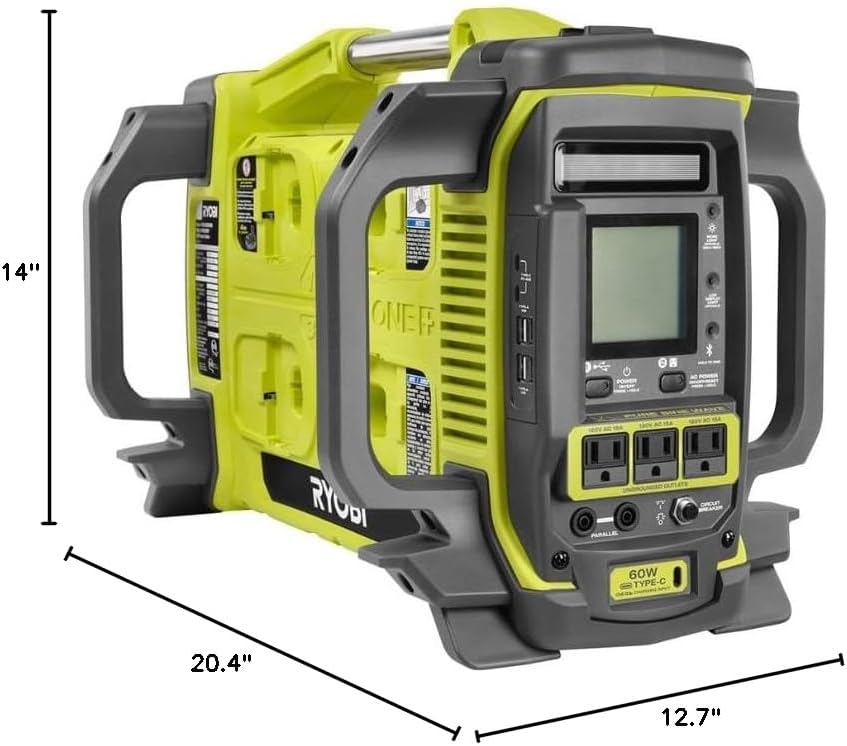
You’ll find the RYOBI power station is designed for portability within the scope of multiple batteries. It’s not a small, single-battery power bank — it’s a modular station meant to sit in a vehicle trunk, garage, or jobsite corner and serve as a portable power hub.
Because batteries are the primary energy carriers, the total weight and footprint depend on how many batteries you attach. If portability is a top priority, you can travel light with a single battery for small loads or add more batteries when longer runtime is needed.
Indoor Use & Noise
The unit’s zero-emissions design and relatively quiet operation make it a good candidate for indoor emergency use, in-cabin power on boats, or RV jack setups where a noisy gas generator wouldn’t be acceptable. You can run sensitive electronics without concern for exhaust or loud generator noise.
Always keep general safety practices in mind: even though it’s quieter and cleaner than gas generators, ensure the unit is placed on a stable surface, is ventilated appropriately for battery heat, and that cords and loads are managed to avoid trip hazards.
Connections & Outlets
You’ll be powering devices through the inverter’s AC outputs, and you can also charge phones, laptops, and other electronics through DC or USB-style ports if present on the unit. The pure sine wave inverter assures stable output for sensitive devices such as computers, medical devices, and modern TVs.
Because exact outlet counts and port types vary or may be listed in the full product manual, verify the specific connection options at the point of purchase if you need a certain number or type of outlets (e.g., multiple AC sockets, USB-C PD ports, 12V DC outlets).
Safety & Maintenance
When you’re using a battery-powered inverter, safe battery handling and maintenance will significantly affect long-term performance and reliability. You’ll want to store batteries at suitable temperatures, avoid deep discharges whenever feasible, and follow manufacturer guidelines for charging and storage.
The RYOBI power station’s inverter is built with protections against common issues like overload and thermal events, and the pure sine output itself reduces the risk of damaging sensitive electronics. However, safe use still requires attention to load limits, secure battery mounting, and monitoring during heavy use.
Pure Sine Wave Technology
You’ll appreciate that pure sine wave output mirrors the waveform of grid power, which minimizes electrical noise, reduces the likelihood of interference with audio/video equipment, and keeps sensitive power supplies operating smoothly. If you plug in a laptop, TV, or medical device, pure sine wave helps ensure stable operation.
This is especially important if you use variable-speed appliances, modern electronics with active power factor correction, or sensitive office equipment. Cheaper modified-sine inverters can cause flicker, buzzing, or inefficiencies on some devices that pure sine avoids.
Battery Management & Overload Protection
Batteries should be managed so they aren’t deeply or repeatedly discharged beyond the recommended depth-of-discharge, and you should avoid situations that would cause the inverter to be overloaded for extended periods. The unit typically includes protections that will shut down the inverter if the load is too high, the batteries are critically low, or if internal temperatures exceed safe limits.
You should also avoid exposing batteries to extreme cold or heat, and follow manufacturer guidelines for storage charge level if you’re stowing batteries long-term. Those practices extend battery life and keep the power station reliable for longer.
Use Cases & Scenarios
You’ll find the RYOBI power station useful across a range of situations: home backup, camping, jobsite tool power, recreational vehicle support, and emergency preparedness. Its modular battery approach means you can tailor power and runtime to the situation at hand.
Think about how you’ll actually use the unit: if you want to power a fridge and a couple of lights during an outage, eight 12Ah batteries might be ideal. If you just need phone and laptop charging on a weekend trip, a single battery could be all you carry.
Home Backup Power
For short-term power outages, the unit can keep a refrigerator, several lights, and electronics functioning for many hours or even days depending on how many batteries you connect. Because the inverter can handle startup surges, you can run motor-driven devices like refrigerators and sump pumps (within the power limits) without immediate shutdown.
Plan your loads carefully: prioritize what you really need to run, and measure or estimate each appliance’s wattage to calculate expected runtime. For longer outages, incorporate a plan for recharging batteries with solar or grid charging where available.
Outdoor & Jobsite Use
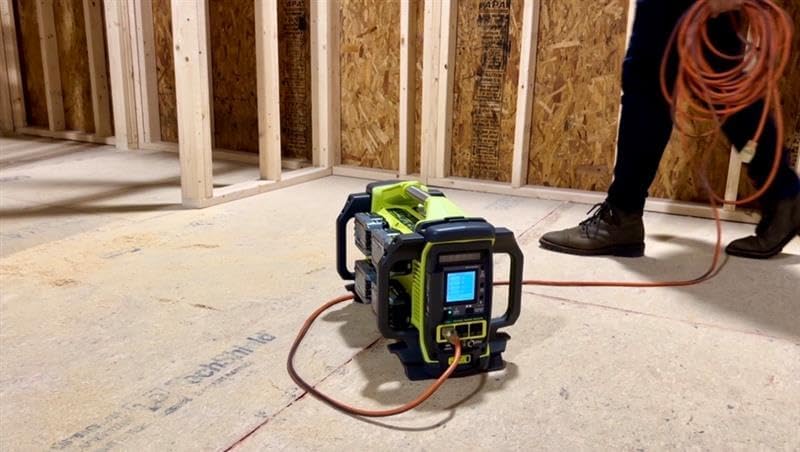
You’ll find this product handy on jobsites where you already use RYOBI ONE+ batteries — the batteries you use in your tools can become your power bank for lighting, charging phones, running cordless tools briefly, or powering small AC loads. Because the inverter is quiet and emissions-free, you can use it inside a work trailer or indoor workspace without the typical concerns of a gas generator.
The modular nature means you can tailor the amount of carried battery weight based on the job. For heavy continuous tool use, consider rotating batteries to avoid extended deep discharge cycles on any single battery.
Emergency Preparedness
If you’re building an emergency kit, the RYOBI power station lets you start small and scale up by acquiring additional ONE+ batteries over time. Batteries and accessories you already own in the ONE+ ecosystem keep adding value, because they can serve both tools and emergency power needs.
Include a plan for recharging (solar, vehicle, or grid), and factor in whether you’ll need continuous power for medical equipment — verify power and runtime requirements for any medical devices before relying on this unit as primary backup.
Setup & Operation
You’ll find setup straightforward, but there are a few practical steps to follow to get everything running and to make sure you’re operating safely and efficiently. The following steps will help you get the unit prepared for first use and everyday operation.
- Verify battery compatibility and ensure all battery contacts and slots are clean and dry.
- Install batteries according to the user manual, making sure they click into place and that any battery-level indicators are visible.
- Connect loads and test the inverter under the intended load size before relying on it for critical appliances.
- If you plan to use solar charging, set up your solar panels and any required charge controllers per the power station’s recommendations.
Installing Batteries
Installing batteries is typically a simple, tool-free process of sliding each 18V ONE+ battery into its bay or connection slot on the power station. You’ll want to verify orientation, ensure each battery is fully seated, and check any indicator lights for proper connectivity.
Always consult the manual for any sequence or limitation — for example, some systems may recommend installing or removing batteries in a certain order, or may limit hot-swapping when the inverter is under heavy load. If you’re unsure, power down the inverter before swapping batteries.
Operating the Inverter
You’ll use the push-button controls to turn the inverter on and off, and you may have status LEDs to indicate battery levels, load state, or fault conditions. Test the inverter with a moderate load first to confirm everything is functioning, and keep an eye on battery indicators during use to avoid unexpectedly deep discharges.
If the inverter cuts out due to overload or low battery, allow it to reset and reduce your load or recharge batteries before resuming. For extended operations, rotate batteries and avoid fully depleting cells if you want to prolong battery life.
Pros and Cons
It helps to see the strengths and trade-offs clearly when you’re choosing a power solution, so here’s a friendly breakdown to help you decide whether this RYOBI model matches your priorities.
Pros:
- Modular battery system lets you scale runtime by adding batteries you likely already have in the ONE+ ecosystem.
- Pure sine wave inverter is safe for sensitive electronics like laptops and modern TVs.
- Quiet and emissions-free, suitable for indoor use and noise-sensitive environments.
- Good surge capacity (3,000 W) to handle motor startup currents for devices like refrigerators.
- Includes adapter for consecutive charging of up to eight batteries and supports solar charging.
Cons:
- Sold as tool-only; you’ll need to buy batteries separately if you don’t already own ONE+ batteries.
- Consecutive charging of eight batteries can lead to long total recharge times if the adapter charges one at a time.
- High continuous loads drain battery capacity quickly, so you’ll need multiple batteries to sustain heavy usage.
- Portability depends on battery count; fully loaded with eight batteries, the station becomes substantially heavier.
Comparison with Alternatives
When you’re weighing the RYOBI power station against other options, think about the trade-offs between modular battery ecosystems, single integrated battery power stations, and traditional gas generators.
Gas Generators
You’ll get longer continuous runtime and easier quick refueling with gas generators, and they generally deliver higher continuous power per dollar for long-duration heavy loads. However, gas generators produce fumes, require regular maintenance, are noisy, and aren’t safe for indoor use without special ventilation.
If you need quiet, indoor-safe power for electronics or you already own RYOBI ONE+ batteries, the RYOBI inverter is a practical choice. If you’re powering very large loads for extended periods in an outdoor setting and portability of fuel is simpler, a gas generator might be more appropriate.
Other Battery Power Stations
Compared with integrated power stations (like single-unit systems with built-in battery packs), the RYOBI approach lets you leverage an existing battery ecosystem for tool and power station synergy. Other power stations may include built-in large batteries and simultaneous multi-bay fast charging, but they might be more expensive to extend.
If you already own RYOBI ONE+ batteries, this unit gives you a cost-effective way to assemble a sizeable battery bank. If you don’t own batteries yet and want a turnkey solution with rapid multi-battery charging, compare the total cost and convenience of integrated power stations versus building a RYOBI-based system.
How Many Batteries Do You Need?
The right battery count depends on the loads you want to run, how long you need them to run, and how often you can recharge. Use this as a practical guide to help you choose.
- For light use (phone charging, occasional lights, small tools): 1–2 batteries may suffice for short outings.
- For moderate use (TV, a few lights, laptop, occasional fridge support): 2–4 batteries will increase runtime and let you hit the inverter’s higher power tiers (4 batteries enable the full 1,800 W capability).
- For long-duration backup (keep fridge and essentials running for many hours/days): 6–8 batteries will give you substantial energy reserves and multi-hour to multi-day capability depending on load.
Remember that a single 12Ah battery provides about 216 Wh, and one battery can deliver up to 450 W — but that high draw will exhaust the battery quickly. If you plan heavy usage, more batteries are the practical route.
Maintenance Tips
You’ll extend the useful life of your system by following straightforward maintenance steps. Keep batteries cool and dry, avoid extreme temperatures, and store batteries at a partial charge if you won’t use them for long periods.
Check contact points for corrosion or damage, cycle batteries periodically if they sit in storage, and keep the inverter vents clean to prevent overheating. If you use the power station in dusty environments, consider a protective cover when the unit is idle.
Battery Storage Recommendations
When storing batteries long-term, aim for a storage charge of roughly 30–50% (check the battery manual for specific ranges), and check them every few months to top them up if needed. Avoid leaving batteries fully discharged for extended periods, and don’t expose them to freezing or very high temperatures.
Troubleshooting Common Issues
If you encounter problems, your first steps should be basic checks: ensure batteries are fully seated, confirm charge level, check for active fault LEDs, and reduce load if the inverter trips.
- If the inverter won’t start: verify battery presence and charge, and try starting with only one battery to confirm basic function.
- If the inverter shuts down under load: you’re likely overloaded or batteries are depleted; reduce load and recharge.
- If you observe unusual noises or smells: power down immediately and inspect batteries and inverter for damage; contact customer support if anything looks abnormal.
Accessories and Expansion
You’ll benefit from thinking about accessories that match your use case: additional ONE+ batteries (higher Ah for more runtime), a multi-bay fast charger if you need quicker recharge cycles, solar panel arrays for off-grid recharging, and storage solutions to keep batteries organized and protected.
If you intend to use the unit regularly for serious outage coverage, investing in more battery capacity and a faster parallel charging approach will improve your experience and minimize downtime.
Final Verdict
If you already participate in the RYOBI ONE+ ecosystem or you like the idea of a modular, indoor-safe, and quiet inverter that scales with battery count, the RYOBI 1800-Watt Power Station Battery Inverter Push Button Generator/Charger (Tool-Only) is a compelling option for you. It gives you a lot of flexibility: a pure sine wave inverter for sensitive electronics, significant surge capacity for motor starts, and the ability to add batteries as your needs grow.
Keep in mind the trade-offs: you’ll need to provide batteries, and total recharge time for many batteries can be long if you rely solely on the included adapter. If you plan your loads and charging strategy realistically, this system can serve as an effective home backup, jobsite companion, or portable power hub that takes advantage of batteries you may already own.
Disclosure: As an Amazon Associate, I earn from qualifying purchases.