
Looking for a single outlet solution that lets you charge and organize almost everything at once?

Quick summary you can act on right away
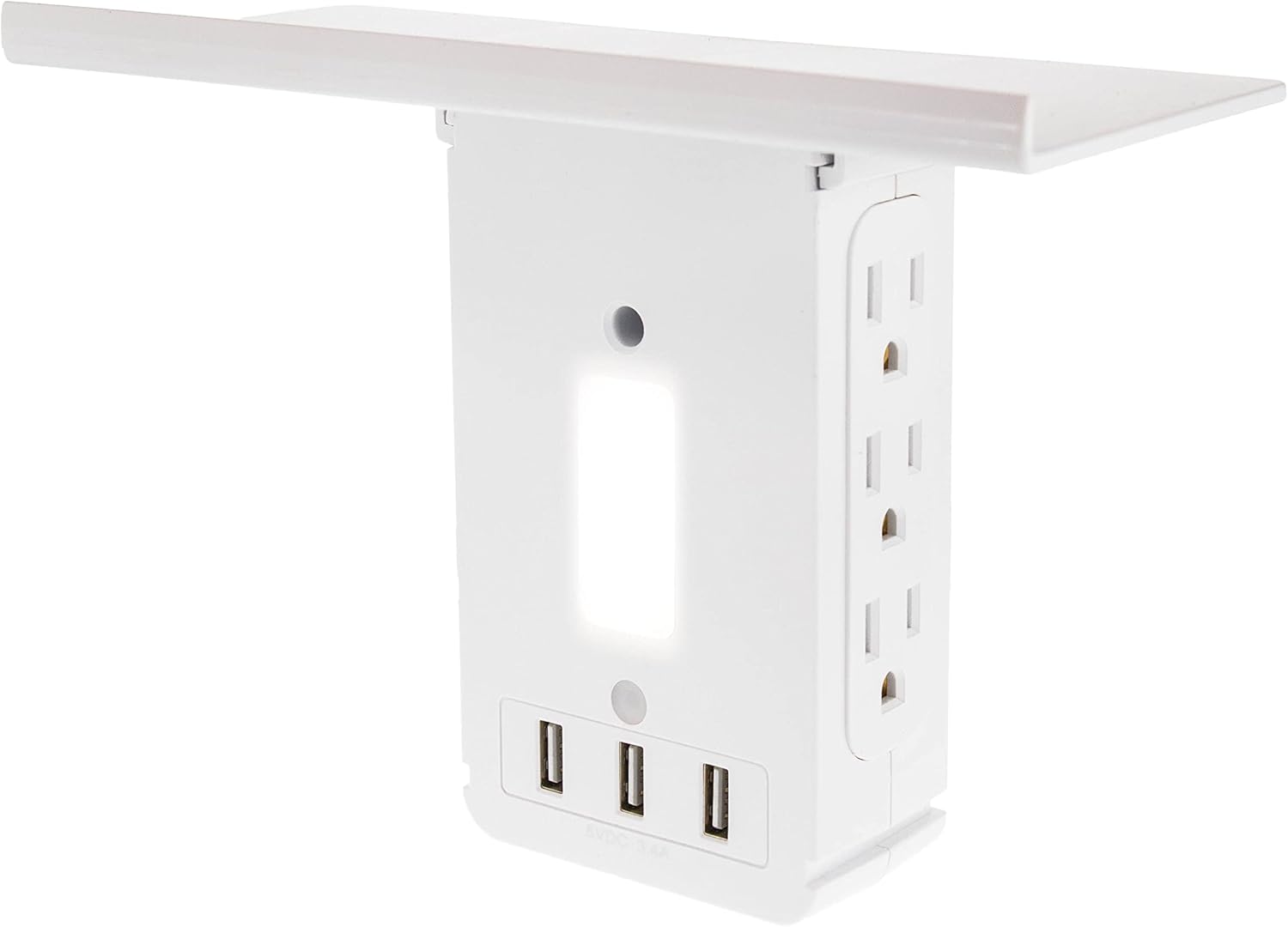
You’ll like how the Swivel Power Outlet Charging Tower Station Shelf – 6 Spin Rotating Wall Charger Ports + 3 Fast Charging USB – Electrical Socket Power Stand Holder – Space Saving + Surge Protector increases usable outlets and gives you a useful shelf. It converts two vertical grounded outlets into multiple AC sockets and fast-charge USB ports while adding a small platform for phones, clocks, toothbrushes, or other small items. Before you buy, check the listing details closely because the product name and the supplied specifications aren’t fully consistent about the number of USB ports—some text says 3 USBs while other details list 2. Confirm which version you’re looking at.
What this product promises for your home
This unit promises to multiply the number of devices you can plug in, add a small shelf for device storage, and protect connected gear with surge protection. It’s designed to be an easy, no-tools addition to any room that has the required two vertical grounded outlets.

Swivel Power Outlet Charging Tower Station Shelf - 6 Spin Rotating Wall Charger Ports + 3 Fast Charging USB - Electrical Socket Power Stand Holder - Space Saving + Surge Protector
What’s in the box and what you should expect
You’ll typically find the charging tower itself and basic instructions in the box. There are no mounting screws because the device plugs directly into two stacked vertical grounded outlets. The shelf is built into the unit and the rotating ports come attached.
What the packaging usually includes
You should get:
- The charging tower with rotating AC ports and USB ports
- A short instruction sheet that explains how to plug it in and usage notes
If anything is missing, contact the seller or manufacturer. Also check the instruction sheet for any additional safety recommendations or country-specific warnings.
Detailed specifications table for easy reading
Below is a simple breakdown of the core specs and what they mean for your daily use. Note the discrepancy in USB port count mentioned earlier—confirm with the specific unit you’re purchasing.
| Feature | Specification / Notes |
|---|---|
| AC Outlet Count | 6 standard spin/rotating outlets (creates more usable plug positions) |
| USB Ports | Product name: 3 fast charging USB; product details: 2 fast charging USB — confirm before purchase |
| Surge Protection | Built-in surge protection (exact joule rating not specified; check manufacturer details for full spec) |
| Shelf | Built-in shelf/stand for small items; holds up to 15 lbs |
| Installation Type | Plugs into two stacked vertical grounded 3-prong outlets (will not work on 2-prong non-grounded outlets) |
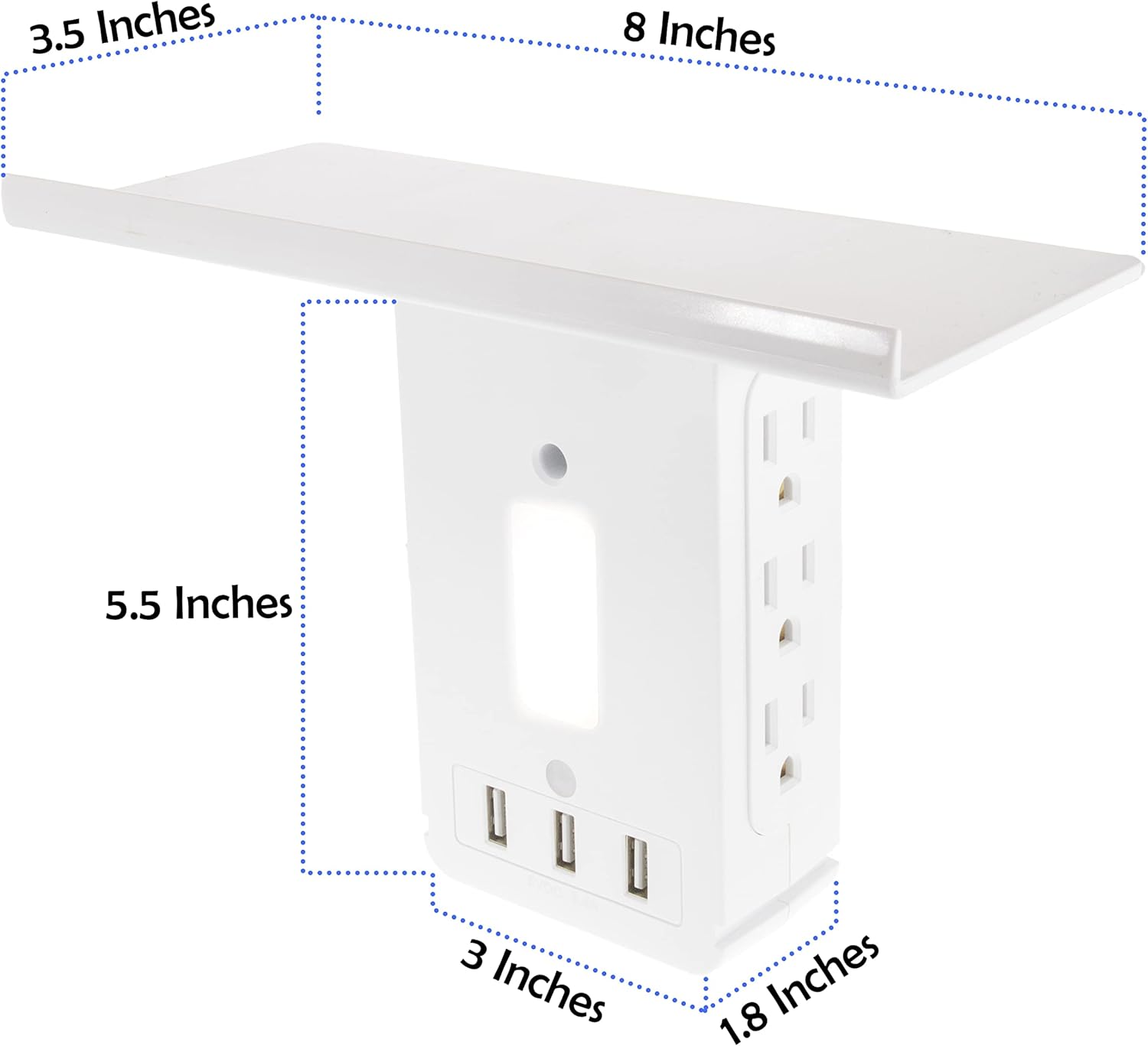
| Dimensions | 7″ x 4″ x 3″ |
| Weight | 9.0 ounces (approx.) |
| Rotation | Spin/rotating outlets to accommodate large adapters |
| Ideal Use Cases | Phones, Echo Dot, Google Home, Wi-Fi devices, electric toothbrush, small tools, cameras, bedside devices |
| Load Limit | Shelf rated to hold up to 15 lbs |
| Country/Voltage Compatibility | Check label for voltage rating; designed for standard household outlets where sold |
Design and build — what you’ll notice first
You’ll immediately notice the compact vertical design and the rotating outlet heads. The rotating/“spin” ports are meant to make bulky plugs and adapters easier to fit without blocking adjacent sockets.
Materials, feel, and rotation mechanism
The housing is molded plastic, lightweight, and designed to be unobtrusive. The rotating outlets let you orient plugs in different directions so you can use wall space more efficiently. The shelf feels firm enough for phones, small chargers, and alarm clocks; still, be mindful of weight distribution when you load it.
Installation — fast and low-effort
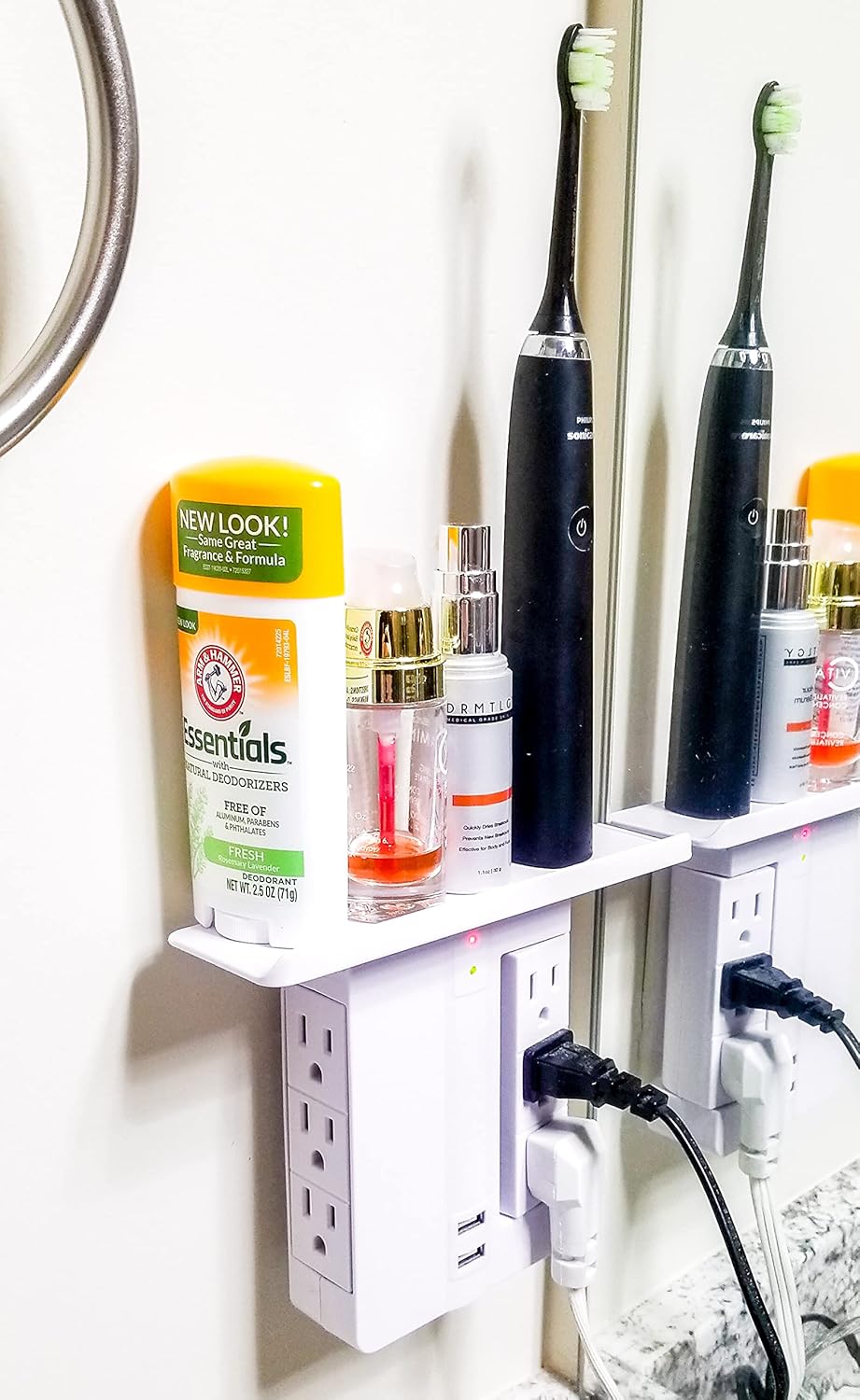
You’ll install the unit by plugging it into two stacked vertical grounded outlets. No tools are required, which is the main convenience factor for quickly adding outlets and a shelf.
Step-by-step install tips
- Confirm the wall outlet is grounded (3-prong). This unit won’t work in two-prong outlets.
- Gently plug the unit into both vertical outlets—align the prongs and push firmly until seated.
- Rotate the AC ports if needed to accommodate bulky adapters.
- Place your device(s) on the shelf and plug in chargers/USB cables.
- If the unit has a reset or switch function for surge protection, read the manual for proper use.
If the plugs are stiff, wiggle them gently; do not force at odd angles. The shelf is stable up to 15 lbs, so you can place multiple phones or small items without worry.
How the charging ports perform
You’ll be able to use multiple devices at once. The AC outlets and USB ports are the core benefits. The rotating AC ports eliminate the common problem of blocked sockets when you use large adapters.
AC outlets: spacing, rotation, and load
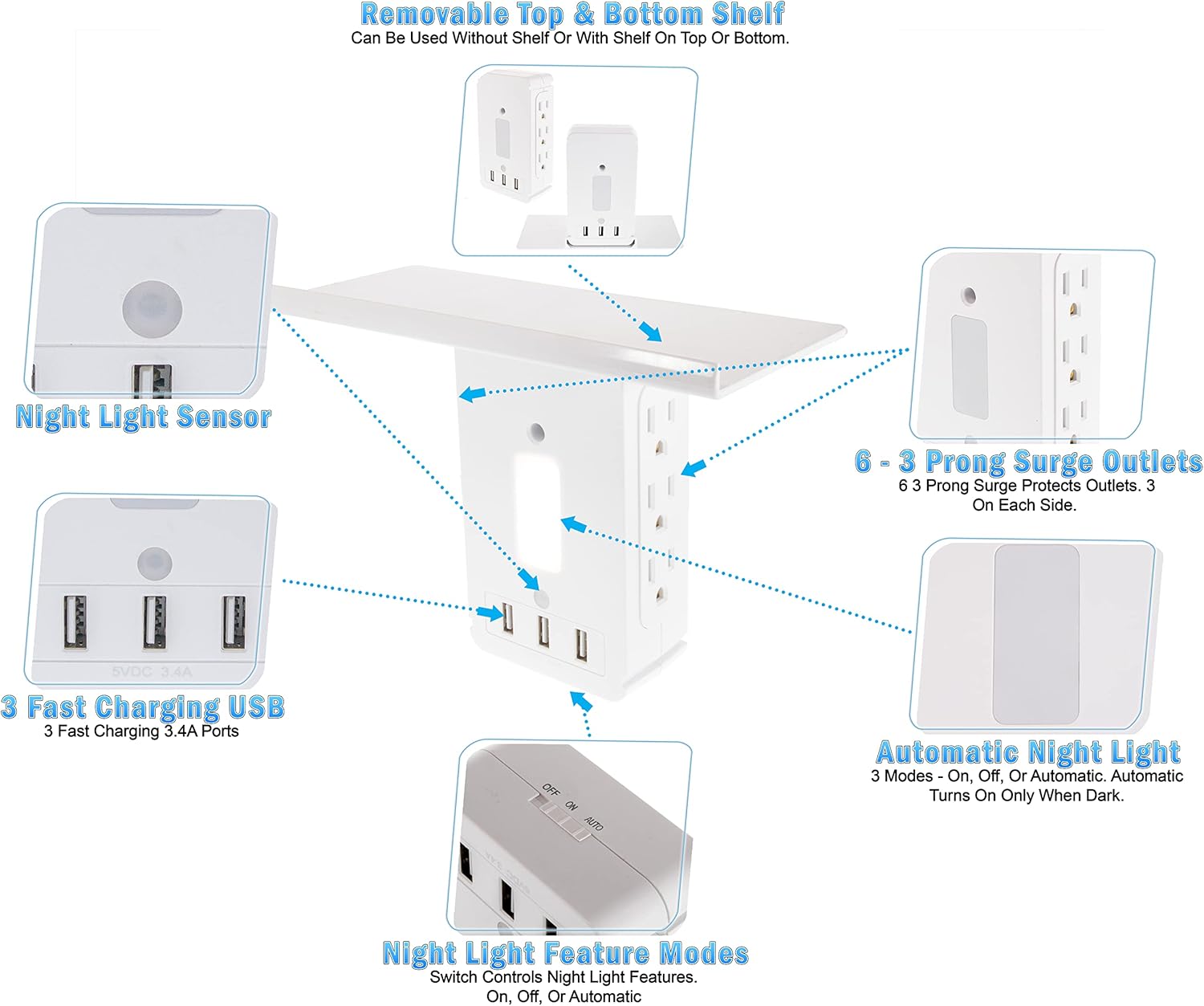
The six rotating AC outlets give you more usable plug positions than a standard duplex outlet. You’ll appreciate being able to plug in a phone charger, lamp, lamp, and other devices simultaneously without one adapter blocking another. Keep in mind that total current draw for the entire unit should not exceed the outlet’s circuit limits. Avoid plugging in high-wattage appliances (space heaters, irons) that draw large continuous current from the same outlet.
USB ports: what to expect
The product descriptions vary between two and three “fast charging” USBs. Fast charging generally means the ports supply higher current than standard 0.5–1A ports—often 2.1A or higher per port—but the exact amperage and whether the ports support USB Power Delivery (PD) or Quick Charge (QC) is not specified. For best results, charge phones, tablets, and smaller electronics; confirm the actual specs if you want guaranteed PD or QC compatibility.
Surge protection and safety features
You’ll get built-in surge protection according to the product details, which is helpful for safeguarding sensitive electronics from voltage spikes. However, no joule rating or clamping voltage is listed in the specification excerpt you provided.
How to interpret “surge protection” here
Surge protection can range from basic to heavy-duty. When no joule rating or warranty information is provided, assume it’s basic protection aimed at small voltage spikes rather than industrial-grade surge suppression. If you want full peace of mind for high-value devices like gaming rigs or high-end appliances, consider pairing this unit with a known, rated surge protector or UPS that specifies joules and clamping voltage.
Shelf use cases and organization benefits
You’ll get additional storage space exactly where you need it—above the outlet. This is handy in cramped rooms, bathrooms, garages, or bedside situations where countertops are limited.
Recommended placements and examples
- Bathroom: Place an electric toothbrush or razor on the shelf while charging (keep it away from direct water).
- Bedside: Hold phones, alarm clocks, or small lamps right next to your bed.
- Kitchen: Hold a smart speaker or small timer while keeping cords neat.
- Garage: Use it for charging tools or cameras and keep small parts off the bench.
This shelf will help keep cords and devices off the floor and counters. Remember that proximity to water still needs careful placement; avoid placing the unit where it might get wet.
Weight capacity and mechanical stability
The shelf is rated to hold up to 15 lbs, which is strong enough for phones, small chargers, and multiple lightweight devices. You should avoid placing very heavy items (large speakers, heavy power tools) on the shelf.
Practical tips for stability
- Don’t overload one side of the shelf; center heavier items to avoid torque on the plug.
- Avoid hanging cables or accessories that could pull the unit outward.
- If you need heavier storage, use a wall-mounted shelf anchored to studs rather than a plug-in shelf.
Compatibility and what won’t work
You’ll need two stacked vertical grounded 3-prong outlets. The unit won’t function in older two-prong outlets, nor will it be compatible with outlets placed horizontally in some installations unless the plug orientation still fits.
Check these before buying
- Are your wall outlets vertically aligned and grounded?
- Do any of your devices draw very high current? (If yes, plug those elsewhere.)
- Do you need USB Power Delivery or Quick Charge specifically? Verify the port specs.
Energy and electrical safety considerations
You’ll want to be conscious of total circuit loading when you populate the outlet tower. Adding multiple chargers and devices increases aggregate current draw and heat generation.
Safety guidelines you should follow
- Don’t plug power-hungry appliances into the unit (e.g., heater, microwave).
- Keep the unit ventilated; don’t cover it or place it inside enclosed boxes while in use.
- Periodically check for heat or discoloration; unplug if you see signs of damage.
- Ensure children can’t easily knock devices off the shelf or access plugs unsafely.
Pros — what you’ll probably like
You’ll enjoy:
- A quick way to multiply outlet capacity without cutting into walls.
- Rotating AC ports that relieve the “blocked outlet” problem.
- A convenient shelf that doubles as a charging stand or small-item holder.
- Surge protection built in for basic device safety.
- Tool-free, plug-in installation that’s reversible.
Convenience highlights
Because the unit uses existing outlets, you don’t need an electrician or tools for setup. That makes it especially handy in rental units or temporary setups.
Cons — what to watch out for
You’ll want to consider:
- Inconsistent product listings for USB count (2 vs 3). Verify the exact model before purchase.
- No stated joule rating for surge protection — limits your ability to evaluate how protective it is.
- Uses both outlet slots, which may be inconvenient if you still need a separate appliance on that circuit.
- Rotating ports are great for spacing, but the plastic housing is still relatively lightweight; heavy or off-balance loads might stress the plug connection.
Practical drawbacks to consider
If you rely on a single outlet for a powerful device like a heater or a large power tool, that device should not be on this multi-outlet hub. Also, if you’re after certified PD fast charging for laptops, this product may not meet that need unless you confirm PD support.
Who this is best for
You’ll find this product very useful if you:
- Live in a small apartment and need more chargers at a single location.
- Want a bedside charging station that keeps phones off the nightstand surface.
- Need a spot in the bathroom for an electric toothbrush or razor.
- Own multiple small devices (smart speakers, Wi-Fi extenders, security cams) that need constant power.
Who should avoid it
You should avoid this if you:
- Need surge protection rated with specific joules for high-value gear.
- Need PD-certified USB ports for fast laptop charging without confirmation.
- Have ungrounded two-prong outlets where you can’t plug this in.
How to make the most of it
You’ll get the best value by planning the setup: use the rotating ports for bulky chargers, keep lighter devices on the shelf, and distribute load across different circuits when possible.
Organization tips you can use
- Group low-power devices together (phones, smart speakers).
- Use label tags for cables so you know which charger belongs to which device.
- Keep a short, neat cable management solution like a Velcro strap or a small basket under the outlet to reduce clutter.
Comparison to alternatives
You’ll find three main categories of alternatives:
- Traditional surge protector power strips: more cords, usually higher joule ratings, but take floor or counter space.
- Wall-mounted multi-outlet surge protectors with cords: often have fixed shapes and require screws or mounting.
- USB-C PD power hubs or smart outlets: specialized charging options with higher wattage but potentially more costly.
When to choose this unit vs another option
Choose this unit if you want a compact, plug-in shelf and you value rotated outlets and added USB ports. Choose a standard surge protector or battery-backed UPS if you need concrete joule ratings, battery backup, or to protect larger electronics.
Safety and compliance checks you should do before use
Check the unit for safety markings (UL, ETL, or equivalent). If those are not displayed, ask the seller for compliance documentation. Confirm the cord and plug are undamaged and that the outlet fits snugly.
What to look for on the label
- Certification marks (UL, ETL)
- Voltage and current ratings (120V, 15A typical for North America)
- Manufacturer contact info and model number
If labels are missing or vague, proceed cautiously and validate through the seller.
Troubleshooting common problems
If you run into issues, these quick fixes often work:
Common issues and fixes
- Unit feels hot: unplug devices, let it cool, then check for damage. Don’t use if heat persists.
- USB port not charging: try a different cable and device to isolate whether the cable or port is at fault.
- Loose fit in outlet: verify the outlet is not damaged and that the unit is fully inserted. If it’s still loose, discontinue use.
Final verdict — should you buy it?
You’ll benefit from this product if you need extra outlets and a small shelf quickly and affordably. It’s a practical solution for phones, speakers, toothbrushes, and small electronics, and the rotating outlets are a thoughtful touch for bulky adapters. However, confirm the exact USB count, and understand the surge protection details before relying on it for high-value equipment. For general household use—charging phones, running small smart devices, and decluttering countertops—it’s a strong, space-saving option.
Frequently asked questions (quick answers)
You’ll likely ask these, so here are concise responses:
-
Q: Does it fit two-prong outlets?
A: No. It requires two stacked grounded 3-prong outlets. -
Q: How many USB ports does it have?
A: The product name says 3, but product details you provided say 2. Confirm the exact listing or packaging before buying. -
Q: Can it handle a laptop?
A: If your laptop charges via USB-C PD, check whether the USB ports support PD and the required wattage. Without explicit PD ratings, assume it’s best for phones and tablets only. -
Q: Is the surge protection reliable?
A: It offers built-in surge protection, but no joule rating is listed. If you need high-capacity protection, use a certified surge protector with a known joule rating. -
Q: Can I mount it permanently?
A: It’s a plug-in unit, not made for screwing into a wall. If you want permanent mounting, look for wall-mounted power centers.
If you want, you can tell me which devices you plan to plug into it and I’ll help you plan the best layout and advise whether this unit is sufficient for your needs.
Disclosure: As an Amazon Associate, I earn from qualifying purchases.