
Looking for a compact, fast-charging portable power station that can keep your devices running during trips, blackouts, and outdoor adventures?
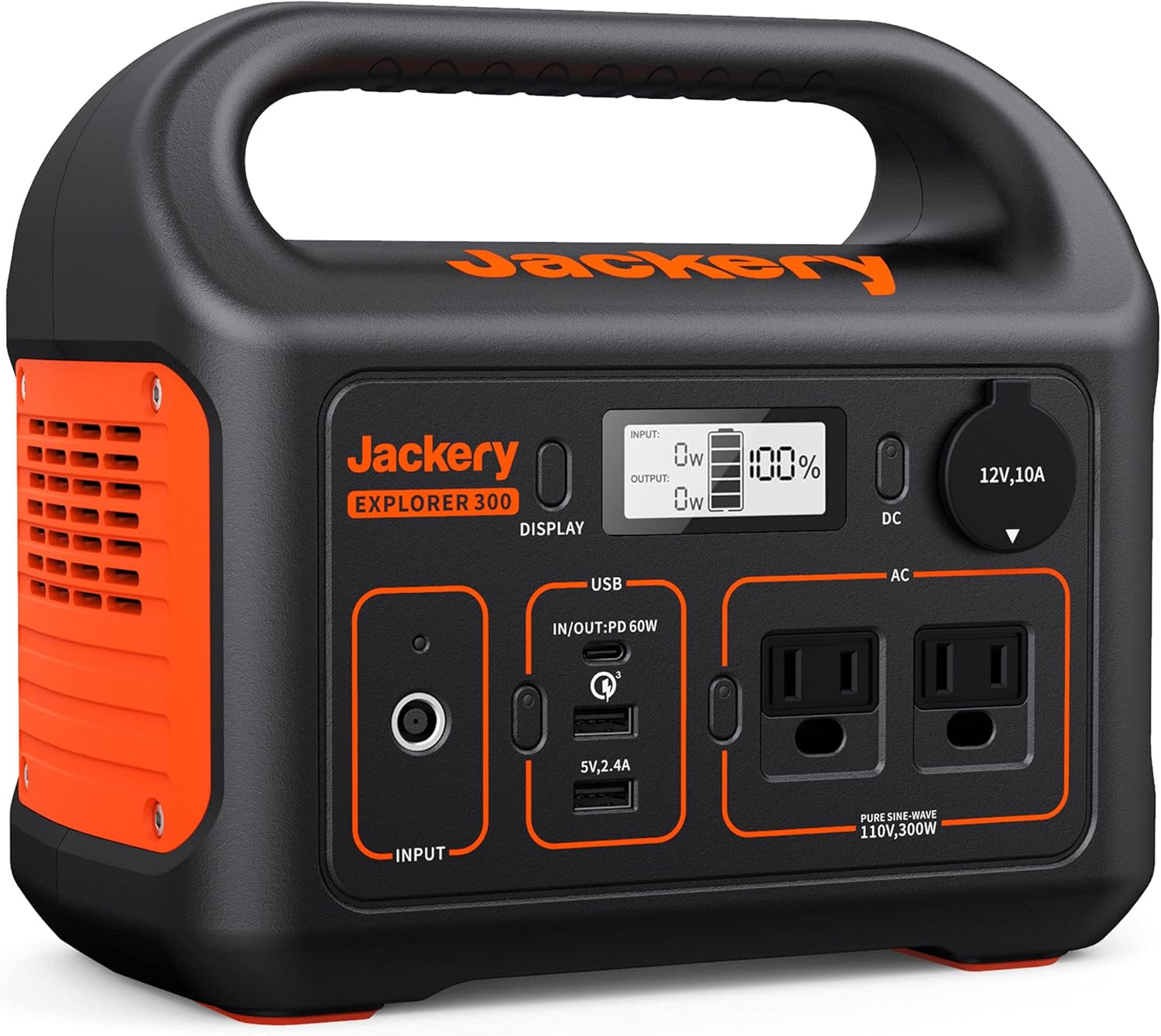

Quick overview of the Jackery Portable Power Station Explorer 300
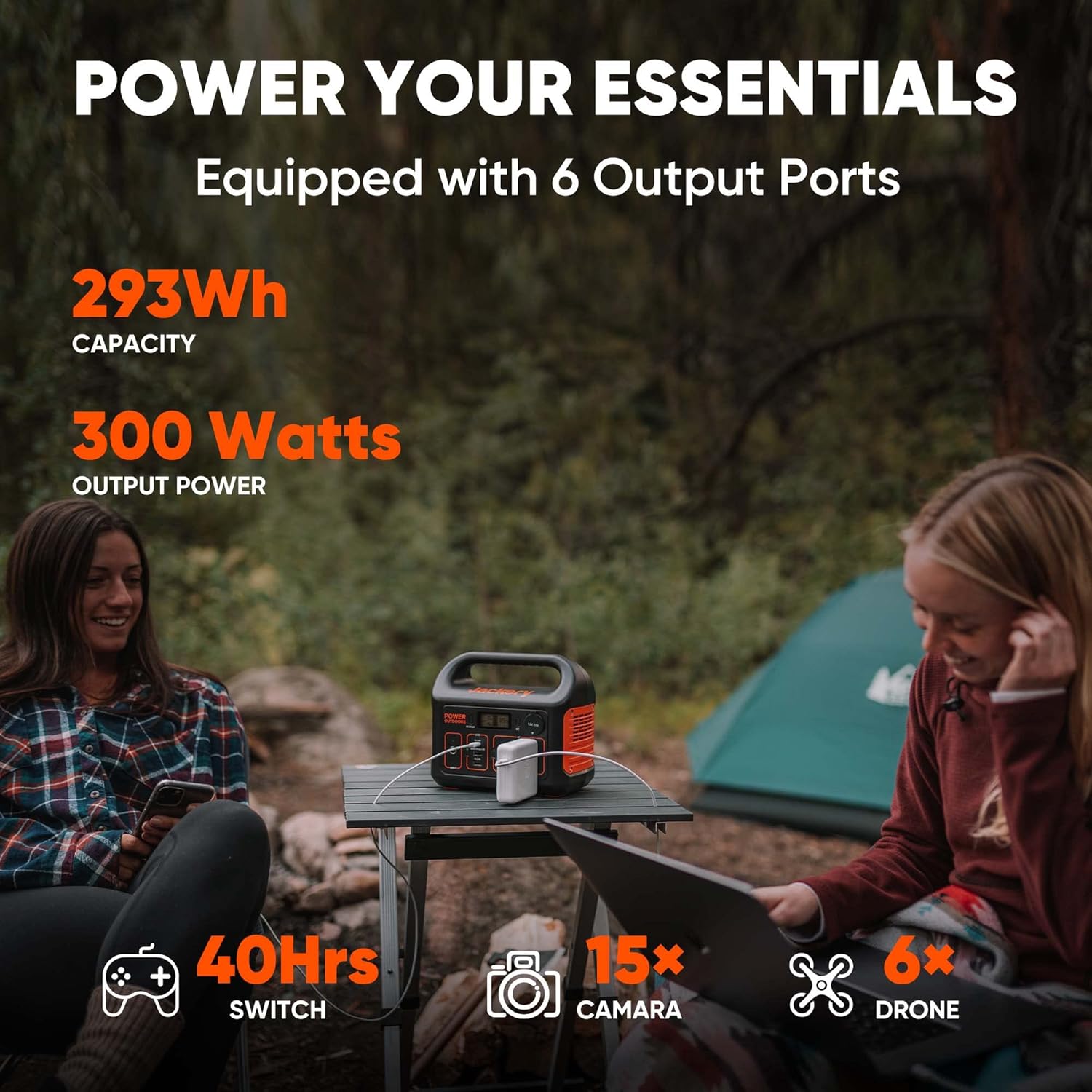
You’ll find the Jackery Portable Power Station Explorer 300, 293Wh Backup Lithium Battery, Solar Generator for Outdoors Camping Travel Hunting Blackout (Solar Panel Optional) built to be lightweight, fast to recharge, and compatible with solar recharging. It’s designed to cover small electronics, some laptops, and essential gear when you’re off-grid or need backup power at home.
What this unit is best for
You’ll appreciate this unit for weekend camping, short road trips, remote work in the field, and emergency backup during outages. It’s ideal when you need reliable power for phones, cameras, drones, small fridges, and laptops but don’t want to carry a heavy generator.
Key specifications and spec table
You’ll want a clear snapshot of the technical specs when comparing power stations or planning what to bring. The table below breaks the main specs into a quick reference for capacity, outputs, and recharge methods.
| Specification | Detail |
|---|---|
| Model | Jackery Portable Power Station Explorer 300 |
| Battery capacity | 293Wh (Lithium-ion) |
| Nominal AC output | 300W continuous (Pure Sine Wave) |
| Peak/surge output | Short surge for startup loads (manufacturer rated) |
| AC outlets | 2 x Pure Sine Wave AC outlets |
| USB-C | 1 x PD 60W (supports input and output) |
| USB-A | 1 x USB-A, 1 x Quick Charge 3.0 |
| DC car port | 1 x 12V car port |
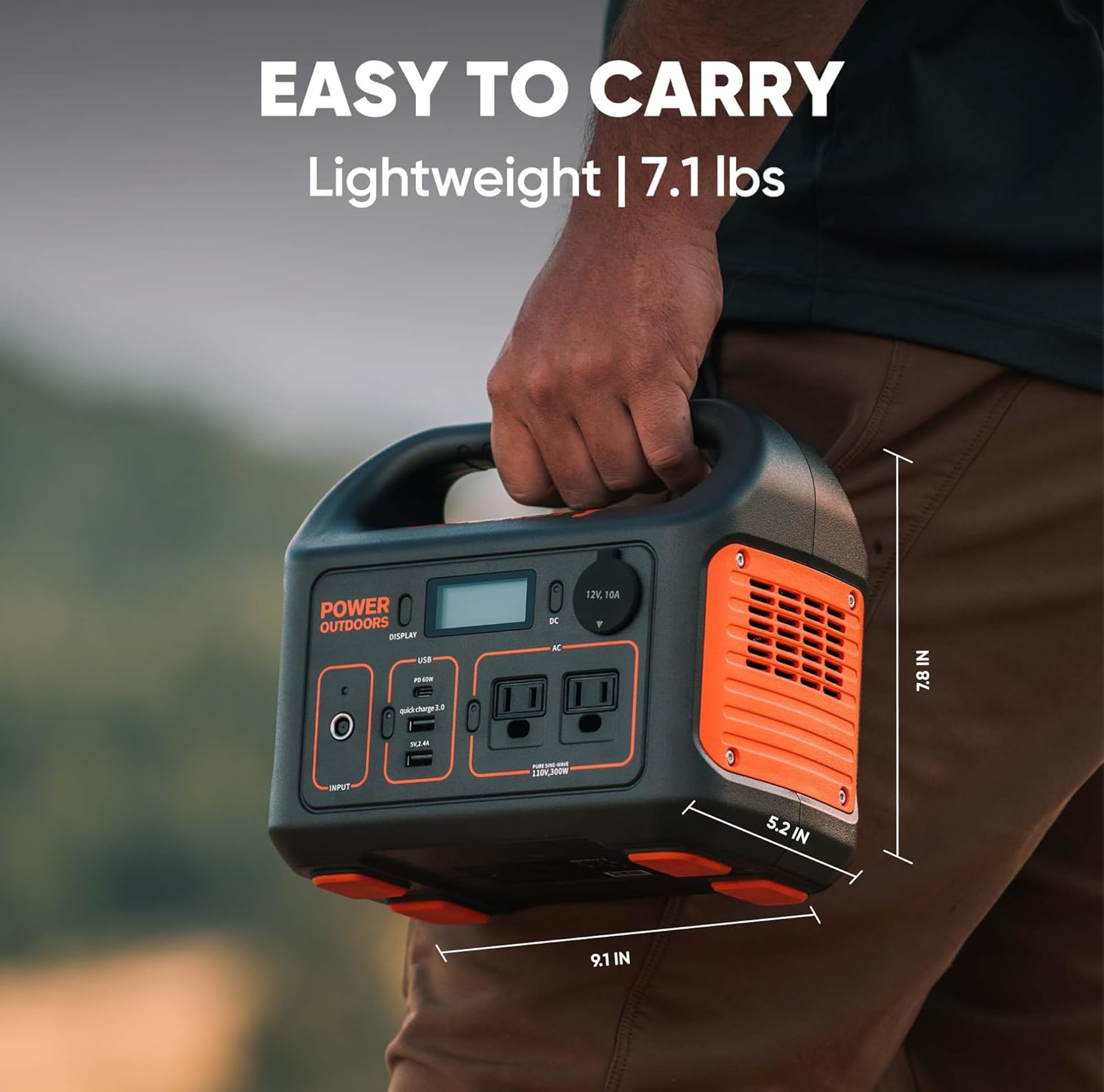
| Weight | 7.1 lbs (approx.) |
| Recharge methods | Wall outlet, 60W PD USB-C, car outlet, Jackery SolarSaga 100 (optional) |
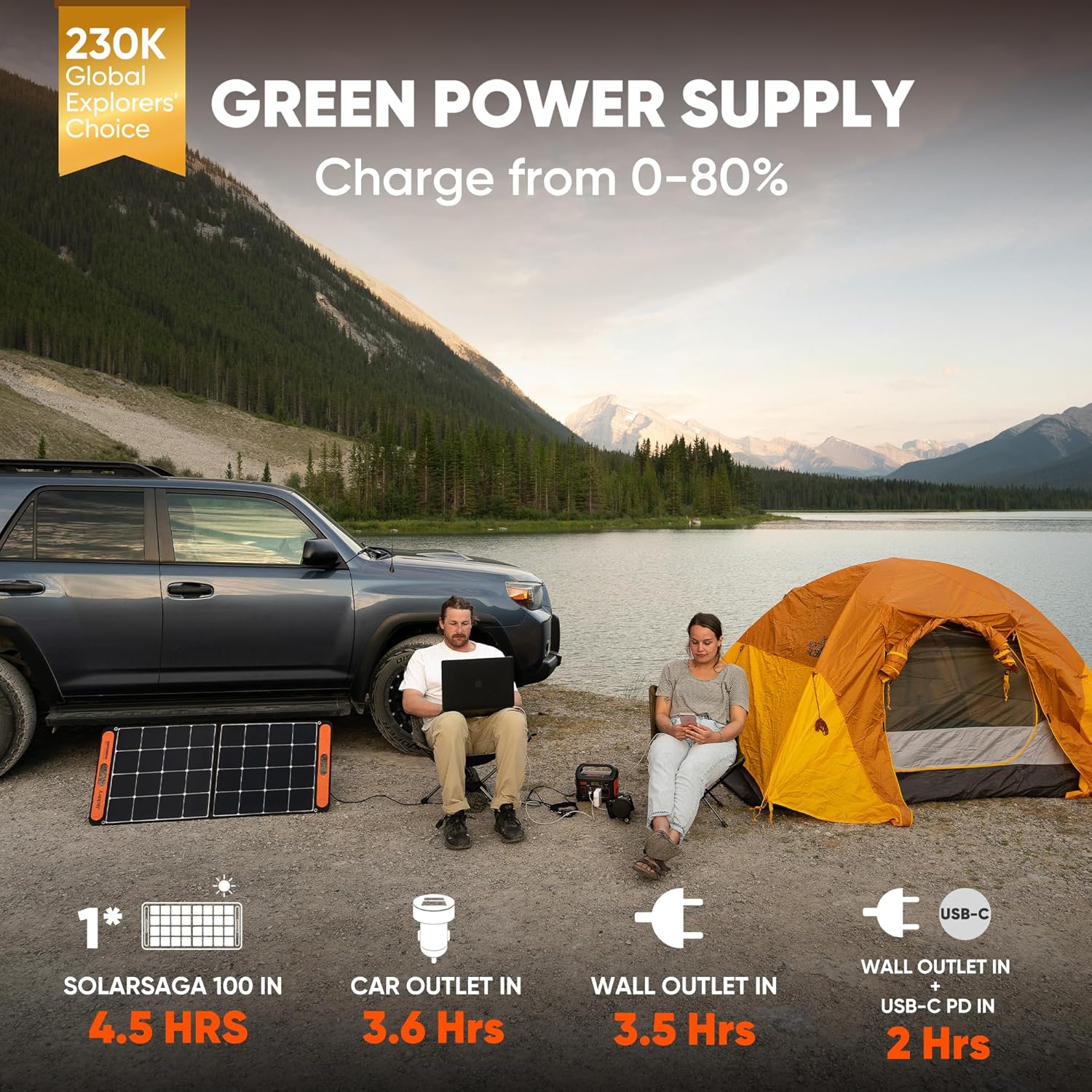
| Recharge time | ~2 hours to 80% with wall + 60W USB-C PD simultaneously |
| MPPT | Integrated MPPT for solar input |
| What’s included | Explorer 300, AC adapter, car charger cable, user guide |
| Solar panel | Not included (optional Jackery SolarSaga 100) |
Why these specs matter
You’ll want to know how much real-world runtime 293Wh provides and whether 300W AC is sufficient for your gear. The PD 60W port and fast recharge capability make this unit flexible for both charging devices and recharging the battery quickly between uses.
Battery capacity and expected runtimes
You’ll get a 293Wh lithium-ion battery, which is a middle-ground capacity suited for lightweight applications and day-use scenarios. That capacity translates to practical runtimes illustrated below to help you plan.
Estimated device runtimes (realistic figures)
These are approximate examples based on typical device power draws and may vary depending on device model and efficiency. You’ll use these estimates to plan how many charges or hours you can expect.
- Smartphone (12 Wh typical): ~20 full charges.
- Laptop (50–60 Wh typical): ~4–5 charges or 4–5 hours of use on a 60W MacBook.
- DSLR camera (10–20 Wh per session): many charges depending on shooting.
- Drone battery (depends on capacity, e.g., 50–60 Wh): about 1–2 full drone batteries.
- Mini-fridge (running ~40–60W average): 4–7 hours (start-up surges may apply).
- CPAP (without humidifier, ~30–50W): 4–8 hours, depending on mode.
How to calculate your own runtimes
You’ll divide device watt-hours by 293Wh and account for inverter efficiency (typically 85–90% for AC loads). For AC devices, multiply your device’s wattage by the hours you need, then compare with available watt-hours after factoring inverter losses.
Recharge speed and methods
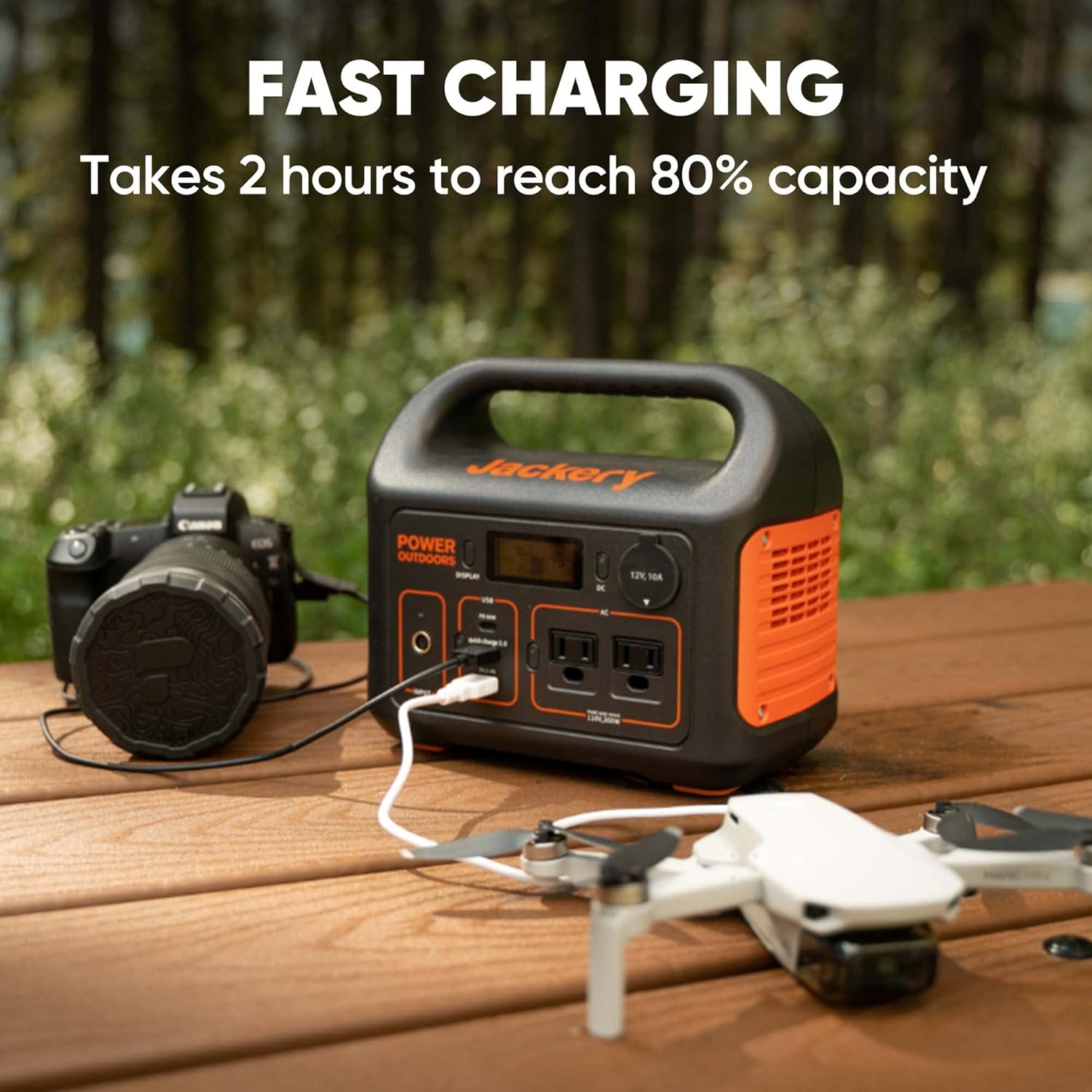
You’ll appreciate the recharge flexibility: fast wall charging, USB-C PD input, car charging, and solar compatibility give you multiple options. The standout is the combined wall outlet plus 60W PD USB-C method that charges to 80% in about 2 hours.
Wall outlet and PD simultaneous charging
When you use the AC adapter and the 60W PD USB-C port at the same time, you’ll reach roughly 80% charge in 2 hours. That’s especially useful when you have a short window to recharge between outings.
Car charging and travel use
You’ll be able to recharge the unit from a car outlet on the road, which keeps you fueled during long drives or when you’re stationary without AC access. Car charging is slower than simultaneous wall + PD charging, so plan for longer sessions if that’s your primary method.
Solar charging with SolarSaga 100
You’ll be able to pair the Explorer 300 with the Jackery SolarSaga 100 panel (sold separately) for renewable recharging. The integrated MPPT controller helps the panel charge the battery at its maximum power point to speed up recharging when the sun is strong.
Output performance and what you can power
You’ll find two Pure Sine Wave AC outlets that deliver clean power to sensitive electronics, rated for 300W continuous output. The 300W rating limits large appliances but covers most small electronics and some small household devices.
AC output limitations
You’ll need to check device surge and startup wattage—some appliances have high inrush currents that a 300W inverter can struggle with. You’ll be fine with laptops, small fans, lights, and low-watt cooking devices like slow cookers only if they draw below the 300W continuous rating.
USB and DC output usefulness
You’ll appreciate the 60W PD USB-C port because it can both charge the power station and deliver rapid power to laptops like MacBook Air models and many ultrabooks. The Quick Charge 3.0 and USB-A ports are convenient for phones, tablets, cameras, and accessories; the DC car port also lets you power 12V devices like inflators and certain fridges.
Portability and build quality
You’ll notice the Explorer 300 weighs about 7.1 pounds, making it genuinely portable for a power station with this capacity. The handle and compact design make it easy to carry into a campsite, vehicle, or around the house during an outage.
Materials and durability
You’ll see a hard plastic housing that’s sturdy for normal outdoor use, though it’s not fully ruggedized to the level of heavy-duty expedition units. Treat it like premium consumer gear—protect it from heavy impact and extreme weather for best longevity.
Safety features and battery management
You’ll be reassured by built-in protections such as short-circuit protection, overcharge protection, and temperature control because those features help prevent damage to the unit and connected devices. The pure sine wave inverter also ensures sensitive electronics see clean power without unusual noise or harmonic distortion.
MPPT and solar safety
You’ll rely on the integrated MPPT controller to optimize solar input and protect the battery during solar charging. That also helps the solar panel and battery run efficiently across changing sunlight conditions.
What’s included and what you’ll need to buy
You’ll receive the Explorer 300, an AC adapter, a car charger cable, and a user guide in the box. If you want solar recharging, you’ll need to purchase the Jackery SolarSaga 100 separately since solar panels are not included.
Optional accessories to consider
You’ll likely want the SolarSaga 100 if you plan extended off-grid use, and a protective carry case can be helpful for transport. Extra USB and DC cables, and potentially a larger solar array in the future, will increase flexibility.
Real-world scenarios and performance examples
You’ll understand how this unit performs by matching it to specific use cases: weekend camping, photography fieldwork, mobile office tasks, tailgating, and emergency backup. The examples below are practical scenarios you may encounter.
Weekend camping or car camping
You’ll run a couple of LED lights, charge phones and cameras, and maybe power a small fan or electric cooler intermittently. The Explorer 300 can easily cover a weekend for two people if you’re conservative with usage and supplement with solar.
Remote work or mobile office
You’ll use the 60W PD port to keep many ultrabooks charged while also powering phones and hotspots. Expect a few hours of continuous laptop use; bring a charging opportunity between work sessions for best continuity.
Photography and film fieldwork
You’ll find the USB ports and 12V port handy for charging camera batteries, drone batteries, and accessories. Bring multiple battery packs or plan to rotate charging when you’re shooting heavily, because high-demand drone work can use significant power.
Emergency or home backup for outages
You’ll rely on this unit to keep essentials like phones, LED lights, and perhaps a small CPAP running for several hours. If you need long-term whole-house backup, you’ll need larger capacity or multiple units stacked.
Comparison with similar capacity units
You’ll want to compare features like recharge speed, weight, and port mix when choosing between similar 200–400Wh units. The 60W PD input/output and the fast wall + PD simultaneous charge are distinguishing features for the Explorer 300.
How it compares on recharge speed
You’ll get faster recharge times than many competitors with only AC charging, thanks to the combined wall + PD method that reaches 80% in about 2 hours. If recharge time is critical for your use pattern, this is a strong selling point.
How it compares on port selection
You’ll benefit from a balanced selection: two AC outlets, PD 60W, Quick Charge 3.0, a USB-A, and a DC car port. The presence of PD input/output makes the unit more future-proof for USB-C powered laptops and devices.
Pros and cons summary
You’ll want a quick list to weigh the main advantages and trade-offs of owning this unit. The pros focus on portability and convenience; the cons reflect capacity and AC limits.
Pros
- You’ll appreciate the fast recharge (80% in 2 hours) when using wall + 60W PD simultaneously.
- You’ll enjoy the 60W PD port that supports many laptops and rapid charging for modern devices.
- You’ll value the lightweight design (about 7.1 lbs) and balanced port selection.
- You’ll like the MPPT-enabled solar compatibility with Jackery SolarSaga 100.
Cons
- You’ll be limited by the 300W AC output for heavier appliances and large surge loads.
- You’ll need to purchase solar panels separately for solar recharging.
- You’ll find the 293Wh capacity insufficient for multi-day whole-camp power without recharging or additional units.
Setup, first-charge, and use tips
You’ll want a few practical tips to ensure you get the most from your new unit right away. Proper first charge, cable management, and storage practices will extend the unit’s life and usability.
First charge recommendation
You’ll charge it fully with the AC adapter before first heavy use to condition the battery and confirm everything works correctly. It’s fine to use the unit during charging, but completing an initial full charge is a good practice.
Best practices for maximizing lifespan
You’ll store the power station at around 40–60% charge if storing long-term and avoid extreme temperatures. You’ll also avoid leaving it completely drained for extended periods and perform occasional charge cycles if it’s unused for months.
Maintenance and care
You’ll want to keep the unit clean, dry, and free of debris in ports to reduce problems. Regular inspection for wear on cables and connectors will help you avoid avoidable failures during trips.
Battery health and storage
You’ll keep the battery at a moderate state of charge and avoid exposing the unit to prolonged heat, which shortens battery life. For long-term storage, charge it to roughly 50% and top it up every three months.
Safety and regulatory notes
You’ll follow local safety regulations when using and charging the unit, especially during air travel and large gatherings. Many carriers and venues have restrictions for lithium-ion batteries above certain capacities, so review policies before flying.
Transport and airline rules
You’ll check airline rules if you plan to fly with the device: many airlines allow portable power stations up to a certain watt-hour limit but require advance approval. Always pack it in carry-on if airline policy allows, and isolate terminals per airline or TSA requirements.
Frequently asked questions (FAQs)
You’ll find concise answers to common questions about the product so you can get quick clarity before buying.
How long does it take to fully charge the Explorer 300?
You’ll reach 80% in about 2 hours when using the wall outlet and 60W PD USB-C together, and a full charge will take a bit longer depending on conditions. Single-method charging (AC alone or solar alone) takes longer and varies with input wattage.
Can the USB-C port charge and recharge simultaneously?
You’ll be able to use the USB-C PD port as both an input and an output, making it flexible for fast device charging and recharging the unit. Be mindful of input/output power limits—PD 60W is the key value to watch.
Is the solar panel included?
You’ll get the Explorer 300 but not the solar panel; the Jackery SolarSaga 100 is compatible but sold separately. If you plan off-grid uses without AC, you’ll want to purchase the SolarSaga 100 or another compatible panel.
Can it run a CPAP machine overnight?
You’ll be able to run many CPAP machines for several hours, but runtime depends on the CPAP model, whether a humidifier is used, and pressure settings. Calculate your CPAP’s watt draw and compare to the battery capacity and allow for inverter efficiency when planning.
Can you chain multiple units together for more capacity?
You’ll need to check manufacturer guidelines—this model is typically designed as a single unit and may not officially support parallel chaining like larger modular systems. If you need more capacity, consider buying a larger-capacity unit or multiple units and manage loads accordingly.
Is it safe to use indoors?
You’ll find it safe to use indoors because it’s a battery-powered inverter without fuel, fumes, or moving parts. Keep it in a well-ventilated, dry area and avoid blocking vents during heavy use.
Final thoughts and buying guidance
You’ll want the Jackery Portable Power Station Explorer 300 if you value a light, fast-charging, and versatile unit for short trips, mobile work, and emergency backup. Its PD 60W capability and rapid recharge feature stand out for users who need quick turnarounds between usages.
Who should buy this unit
You’ll consider this unit if you’re an occasional camper, photographer, digital nomad using mid-power laptops, or someone who needs reliable short-term backup during outages. If you require longer runtimes for larger devices, look at higher-capacity models or plan to use solar panels for extended off-grid use.
Final buying checklist
You’ll confirm that 293Wh is sufficient for your needs, that 300W AC covers your key appliances, and that you’re ready to buy a SolarSaga 100 if you want solar recharge. Also ensure the weight and dimensions fit your transport and storage needs, and check warranty/support options before purchasing.
If you want, you can tell me the devices you want to power and how long you need them to run, and I’ll calculate more exact runtimes and charging recommendations specific to your setup.
Disclosure: As an Amazon Associate, I earn from qualifying purchases.