
Looking for a portable solar panel that can reliably charge your power station and devices when you’re off-grid?
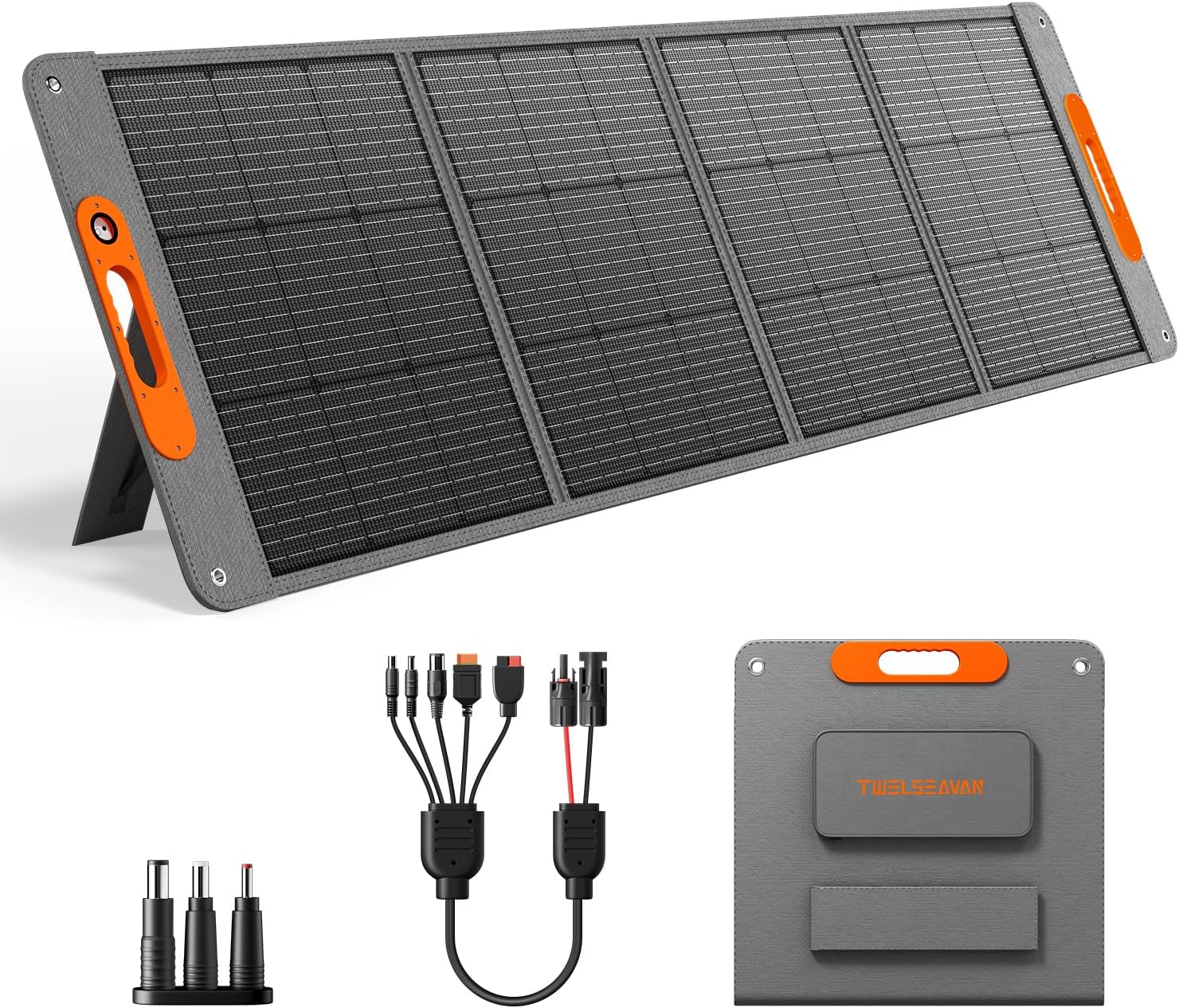

Quick Overview of the 200W Portable Solar Panel for Power Station, 24% High Efficiency ETFE Foldable Solar Panel Charger, QC3.0, Type-C 60W, MC4 Output, IP65 Waterproof, for Outdoor Camping, RV, Emergency Power Supply
You’ll get a high-efficiency 200W foldable solar panel that’s built for mobility and multi-device charging. It combines A+ grade monocrystalline cells with an ETFE laminated surface and an 8-in-1 MC4 connector solution so you can hook up to most portable power stations and charge phones or laptops directly.
What this product aims to solve
You want faster, more flexible solar charging without lugging rigid panels or wrestling with incompatible cables. This panel is designed to give you high conversion efficiency, quick setup, and multiple charging options whether you’re camping, traveling in an RV, or preparing for an emergency.
Key Features
You should know the main selling points before deciding if this panel suits your needs. Each feature below explains why it matters and how it impacts real-world use.
High Conversion Efficiency and ETFE Lamination
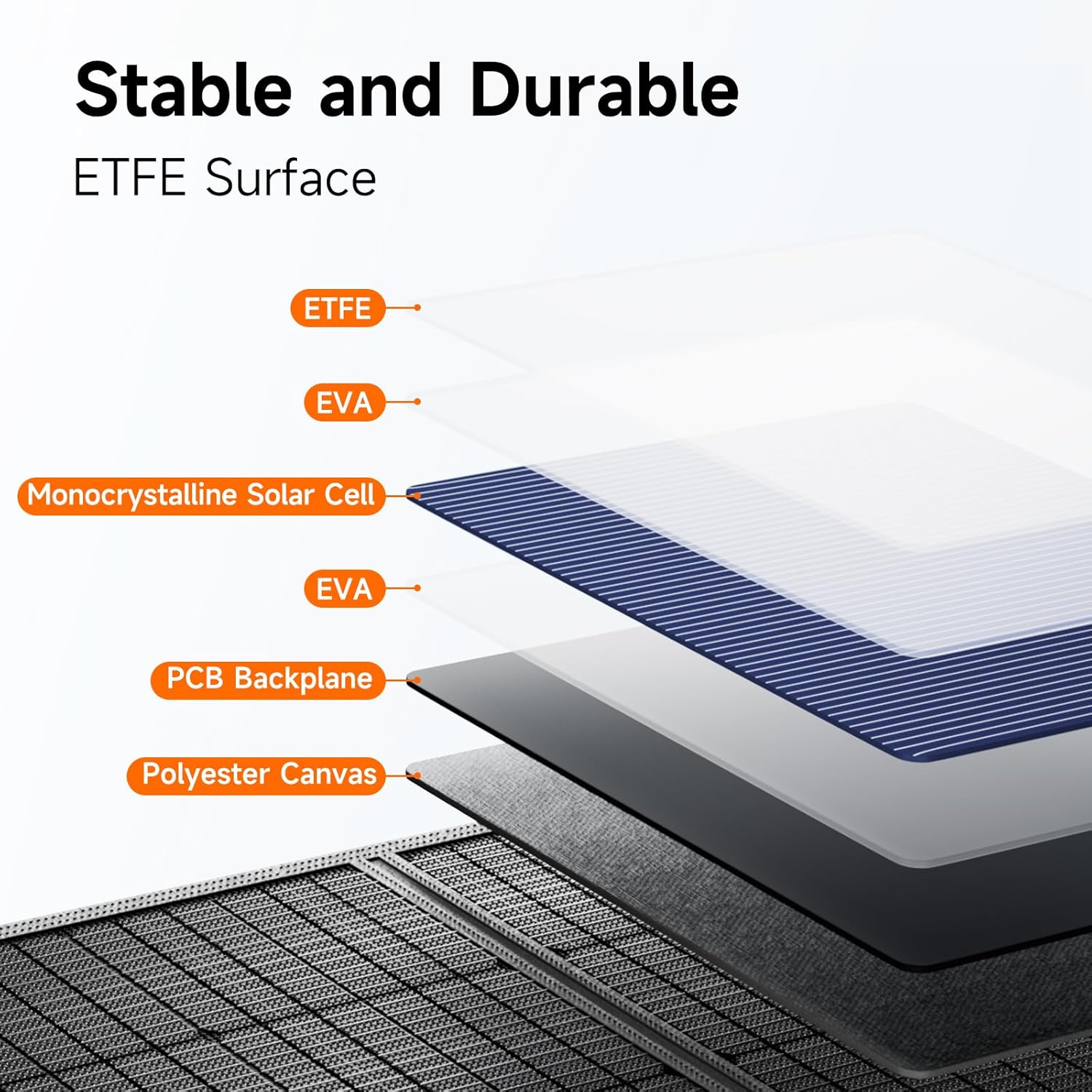
The panel uses upgraded A+ grade monocrystalline solar cells that reach about 24% conversion efficiency. The ETFE laminated case increases light transmission above 95%, which helps your cells perform better under the same sunlight compared with older materials.
200W Peak Output
On paper, the panel can deliver a maximum of 200 watts in ideal sunlight conditions. That peak capacity gives you the flexibility to charge mid-size power stations faster than typical 100W foldable panels.
8-in-1 MC4 Converter and Wide Compatibility
Twelseaven supplies a 5-in-1 MC4 connector cable plus 3 DC adapters, giving you a total of eight connection options. You’ll be able to connect quickly to brands like Jackery, EcoFlow, Bluetti, Flashfish, Anker and many other portable power stations.
Multiple Fast-Charging Ports (PD60W and QC3.0)
The panel includes a USB-C PD port delivering up to 60W, a QC3.0 USB port up to 18W, and an additional USB-A port. Those ports let you charge your laptop, phone, tablet, and accessories directly when you’re not using a power station.
Foldable, Lightweight, and Portable Design
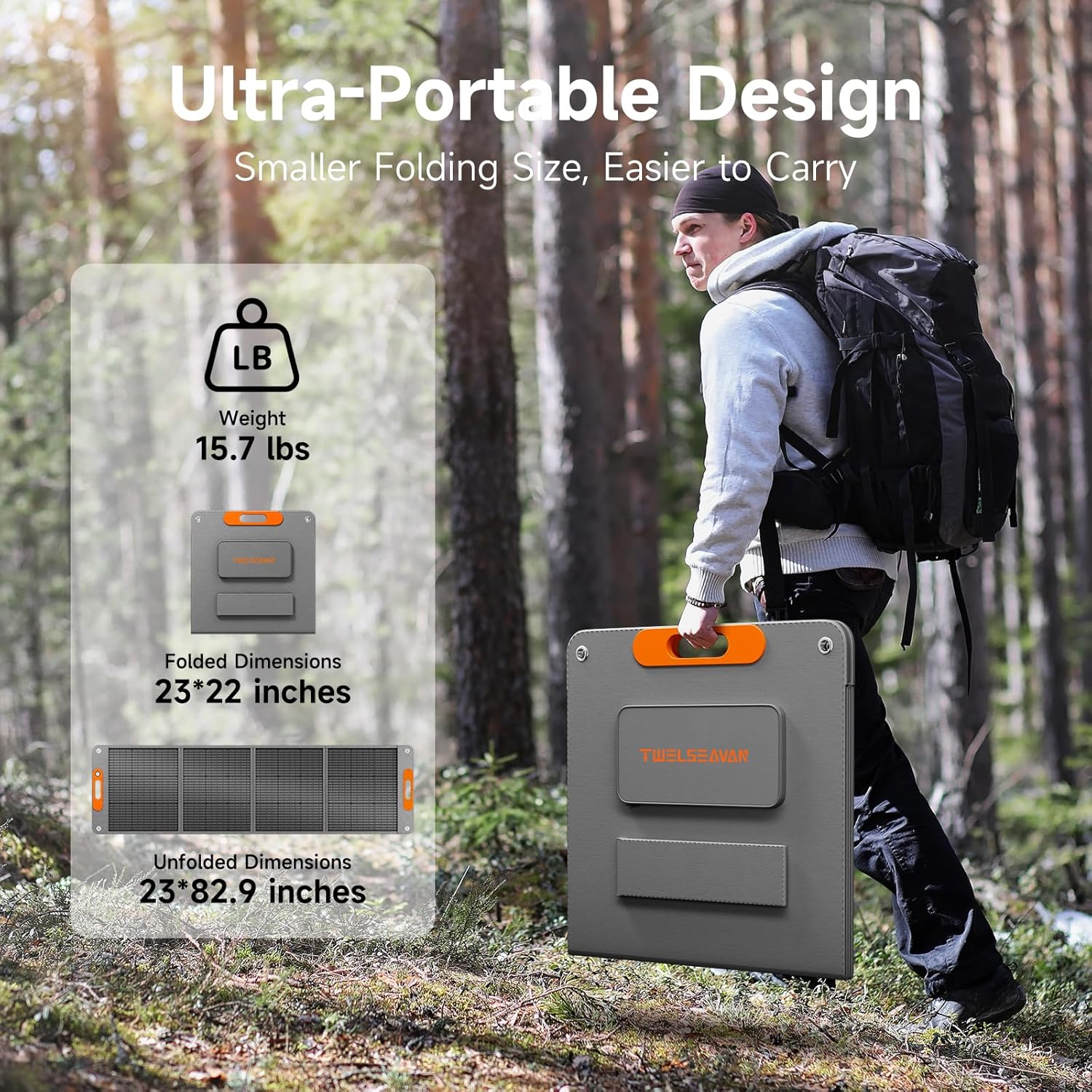
Weighing about 15.7 lbs and folding down to approximately 23 x 22 inches, this panel is much easier to carry than most rigid arrays. The magnetic handle and four adjustable kickstands make setup and transport more convenient for one person.
IP65 Weather Resistance and Durable Construction
The back uses high-density polyester canvas and the front uses ETFE to give you resistance to wear, dust, and heat. With an IP65 rating the panel resists water jets and dust intrusion, so you can use it outdoors without constant worry about light rain or dusty conditions.
Simple Setup with Adjustable Kickstands
You can set the panel up in seconds using the four adjustable kickstands to angle the array for better sun exposure. You’ll find small adjustments improve output dramatically throughout the day.
What’s in the Box and Support
When you receive the panel you’ll get the Twelseaven 200W solar panel, an MC4 connector cable (MC4 to Anderson/XT60/8020/7909/5521), three DC adapters, and a user manual. Twelseaven backs the panel with a 24-month warranty, a 30-day money-back guarantee, and lifelong customer service.
Specifications Table
You’ll find the most important technical details summarized below to make comparison and planning easier.
| Specification | Detail |
|---|---|
| Panel Type | A+ grade monocrystalline cells |
| Conversion Efficiency | ~24% |
| Rated Power | 200W (maximum under ideal sunlight) |
| ETFE Light Transmission | >95% |
| Folded Size | Approx. 23 x 22 inches |
| Weight | 15.7 lbs (approx.) |
| USB-C (PD) Port | Up to 60W |
| USB-A QC3.0 Port | Up to 18W |
| Additional USB-A | 5V/3A |
| Connector Cable | 5-in-1 MC4 cable + 3 DC adapters (total 8 connection options) |
| MC4 Cable Length | ~9.8 ft (3 m) |
| Back Material | High-density polyester canvas |
| Waterproof / Weather Rating | IP65 |
| Kickstands | 4 adjustable |
| Included Adapters | MC4 to Anderson/XT60/8020/7909/5521 |
| Warranty | 24 months + 30-day money-back guarantee |
Performance in Real-World Conditions
You’ll want realistic expectations of what the panel will output in common conditions rather than ideal lab numbers. Here’s how it behaves in different light and temperature scenarios.
Peak Sunlight Output
In clear, direct sun with the panel angled optimally, you can approach the 200W peak for limited periods. You should expect peak values during the sunniest hours and when panels are cooler.
Typical Output in Good Conditions
Most of the time you’ll see actual output between 120W and 170W depending on sun intensity, angle, and temperature. That range represents what active users should assume when planning charging sessions.
Output in Partial Shade or Overcast
If clouds move in or partial shading occurs, outputs drop considerably and become inconsistent. You’ll want to minimize shade on any part of the panel because shading even a small area can disproportionately reduce power.
Effect of Angle and Temperature
You need to angle the panel toward the sun and avoid overheating to maintain good performance. The ETFE surface helps with light transmission, but high temperatures can still reduce efficiency, so occasional repositioning and airflow underneath the panel help.
Estimated Charging Times (Examples)
You’ll find the following examples helpful for planning. Actual times will vary with conditions:
- Charging a 500Wh power station: with ~160W average input it’ll take roughly 3–3.5 hours of solid sun.
- Charging a 1000Wh power station: with ~160W average input it’ll take about 6–7 hours of full sun.
- Charging a smartphone with PD60W: many phones will charge quickly via USB-C, often reaching 50% in 20–40 minutes depending on that phone’s charging curve.
- Charging a 60W laptop via PD: expect the panel to supply meaningful charge while you use the laptop; full charge time depends on laptop battery size and state.
Setup and Installation
You’ll find the setup straightforward, but a few steps make it faster and safer. Follow these tips to reduce fuss and maximize output.
Unfolding and Placing the Panel
Unfold the panel on a flat, stable surface, extend the magnetic handle, and secure the kickstands. You should point the panel toward the sun and adjust the angle for midday and morning/afternoon differences.
Using the MC4 Cable and DC Adapters
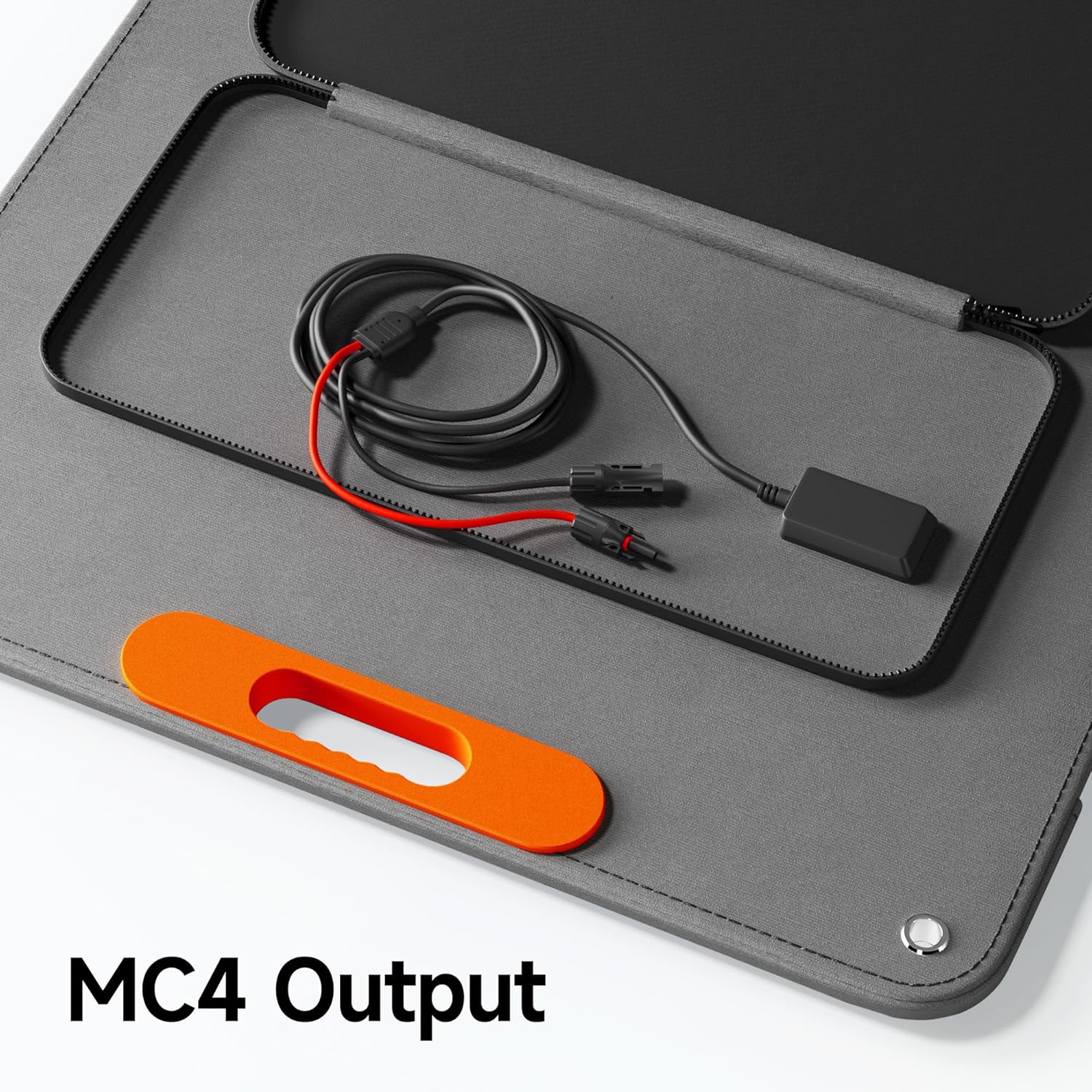
The included 9.8 ft MC4 cable gives you reach for flexible placement. Match the correct DC adapter to your power station input — the kit includes common adapters so you shouldn’t need extra connectors in most cases.
Direct USB Charging
If you want to charge phones, tablets, or a USB-C laptop, simply connect the device to the USB-C PD port or the QC3.0 USB-A using your normal cable. The built-in IC chip negotiates the charge current to protect your device.
Avoiding Common Setup Mistakes
You’ll want to avoid partial shading, stacked panels, or let the panel sit flat against hot surfaces that reduce airflow. Also double-check connector polarity and click-fit connections before leaving the panel unattended.
Compatibility Details
You’ll want to be sure this panel works with your equipment before you buy. Here’s how compatibility is handled and what you should check.
Supported Portable Power Stations
The panel is explicitly compatible with Jackery, EcoFlow, Bluetti, Flashfish, Anker and many other brands thanks to the included MC4 adapter bundle. You should verify the exact input type on your power station and match it to the included adapter.
The 8-in-1 Connection Explained
Twelseaven combines a 5-in-1 MC4 cable with three additional DC adapters to give you a total of eight different connection options. You’ll be able to plug into Anderson, XT60, and several barrel-style inputs without buying extra pieces.
What to Check on Your Power Station
You’ll need to confirm the required voltage and connector type of your power station and ensure the panel’s open circuit voltage and maximum power point are within the power station’s solar input specifications. If unsure, consult your power station manual or the manufacturer.
Pros and Cons
You’ll appreciate the advantages and want to weigh common trade-offs before committing to this panel.
Pros
- High 24% conversion efficiency gives more power per area.
- 200W peak power lets you charge faster than many portable panels.
- ETFE laminate increases durability and light transmission.
- Multiple connection options and PD60W USB-C let you charge devices directly.
- Lightweight and foldable for true portability.
- IP65 rating and robust back material for outdoor reliability.
- Included adapters and long MC4 cable reduce extra purchases.
Cons
- Real-world output often falls below the 200W peak under typical conditions.
- The panel is water-resistant (IP65) but not meant for submersion or prolonged heavy rain.
- You may still need a compatible solar charge controller if connecting directly to some battery setups.
- At 15.7 lbs, it’s portable but not the lightest 200W option available — you’ll balance weight against durability and features.
Use Cases and Ideal Scenarios
You’ll find this panel adapts well to a range of outdoor and emergency situations. Here are practical examples of where it’s most useful.
Camping and Overlanding
You’ll keep lights, phones, coolers, and small appliances running at camp with steady charging throughout the day. The foldable design and magnetic handle make carrying and setting up between sites simple.
RV and Van Life
You’ll use the panel to top up house batteries or run essential electronics while parked or boondocking. The 200W capacity lets you supplement onboard charging and stretch time between shore power stops.
Emergency and Backup Power
You’ll benefit from a portable charging source during grid outages to power lights, comms, and medical devices. The IP65 rating means it’s less likely to fail in sudden weather, and the included adapters make connecting to emergency power stations easy.
Photography, Remote Work, and Field Use
You’ll charge cameras, laptops, and accessories without hunting for outlets, making the panel a practical choice for fieldwork and remote shoots. The PD60W port is especially helpful for powering many modern laptops.
Maintenance and Care
You’ll extend the life and performance of your panel with routine, simple care. A few minutes of maintenance can keep output high season after season.
Cleaning the Surface
Wipe the ETFE surface occasionally with a soft cloth and mild soapy water to remove dust, pollen, or salt buildup. You should avoid abrasive cleaners and hard scrubbing that can scratch the ETFE.
Storage and Handling
When folded, store the panel in a dry place away from prolonged UV exposure and sharp objects. You’ll want to avoid storing it in extreme heat for very long periods to protect the back canvas and internal cells.
Inspecting Connectors and Cables
Periodically check MC4 connectors, DC adapters, and USB ports for dirt, corrosion, or loose fittings. You should replace any damaged cables immediately to avoid poor contact or power loss.
Safety and Precautions
You’ll want to follow safety guidance to prevent damage to devices or injury. Solar panels generate electricity and should be treated with respect.
Electrical Safety
You should avoid shorting outputs and never connect the panel to equipment with incompatible input specs. Use the included adapters and consult your power station’s documentation on allowable open-circuit and maximum power voltages.
Weather and Mechanical Safety
You should not rely on the panel if it’s heavily raining or during storms where high winds may flip or damage it. The IP65 rating protects against rain and dust, but it doesn’t guarantee performance in severe weather.
Preventing Overheating and Fire Risk
You should allow airflow under the panel and avoid stacking it on hot surfaces where heat could accumulate. If a connector gets hot while charging, disconnect and inspect it — overheating indicates a poor connection or mismatch.
Troubleshooting Common Problems
You’ll encounter a few common issues that are usually simple to fix. Here’s a stepwise approach to solve typical problems.
Low or No Output
- Check that the panel is pointed at direct sunlight and remove any shading.
- Confirm connectors are fully engaged and matched to the adapter on your power station.
- Inspect for dirt or grime on the ETFE surface and clean if necessary.
Intermittent Charging
- Look for partial shading, cloud movement, or shadows from handles and kickstands.
- Ensure the MC4 cable and DC adapters are snug and free from damage.
- Try repositioning the panel and verifying the power station’s solar input configuration.
Device Not Charging via USB Ports
- Confirm the device cable and port are functional by testing with another charger.
- Use the PD-capable USB-C cable that supports power delivery for laptops and larger devices.
- Ensure the panel has sufficient sunlight; USB ports will reduce output in low-light conditions.
Connector or Adapter Fit Issues
- Match the adapter carefully — don’t force connectors that don’t fit.
- If an adapter is missing or damaged, use a proper replacement rated for the panel’s voltage and current.
- If you see corrosion or bent pins, stop using that adapter and replace it promptly.
Comparison with Similar Panels
You’ll want to weigh this option against other panels in terms of efficiency, portability, and price. Here’s how it stacks up generally.
Versus Typical 100W Foldables
Compared to 100W foldables, you’ll get about double power and fewer panels to manage for the same power output. The higher efficiency and ETFE surface also give you better performance per square foot.
Versus Rigid 200–300W Panels
You’ll trade off some weather hardiness and mounting permanence for portability. Rigid panels can offer slightly higher continuous output mounted at an optimal fixed angle, but your foldable brings mobility and faster setup.
Efficiency and Weight Considerations
With 24% efficiency, the panel is above average for consumer foldables and competitive with many higher-end models. At ~15.7 lbs, it’s portable enough for solo transport but heavier than ultra-light options — consider the weight if you routinely hike long distances.
Frequently Asked Questions (FAQ)
You’ll likely have questions before you buy or while using the panel, so here are answers to common queries.
Can you connect the panel directly to any power station?
You can connect directly if your power station accepts MC4 with the included adapter or one of the included DC connectors. Always verify voltage and current compatibility with your power station’s solar input specifications.
Is the panel waterproof?
The panel has an IP65 rating, which protects against dust and low-pressure water jets. You should not submerge it or leave it in heavy, driving rain for extended periods.
How many hours of sunlight do you need to fully charge a power station?
Charging time depends on the power station size and real-world panel output. For example, a 500Wh station may take roughly 3–4 hours under good conditions; a 1000Wh station will likely need 6–8 hours of strong sun.
Can you charge a laptop directly from the USB-C PD port?
Yes, many laptops that accept USB-C PD charging will charge from the 60W USB-C port. You should check your laptop’s power requirements; some larger or high-performance laptops may require more than 60W for full-speed charging.
Does the panel include a solar charge controller?
No, a separate solar charge controller is not included unless your specific power station requires one internally. If you plan to connect the panel to battery systems directly (not via a compatible power station), you should use an appropriate MPPT or PWM charge controller.
What happens in cloudy weather?
Output reduces significantly in overcast conditions and charging will be slower. You should plan for variable daily generation and use battery storage to smooth the supply.
Can you chain multiple panels together?
Many users connect multiple panels in series or parallel to increase voltage or current, but you must ensure the combined voltage/current matches your power station or charge controller limits. Follow manufacturer guidelines for parallel/series connections.
How durable is the ETFE lamination?
ETFE is more resistant to UV degradation and scratches than common PET laminates, so you should see extended surface life. You’ll still want to avoid using harsh chemicals or abrasive brushes when cleaning.
Final Recommendation and Verdict
You’ll appreciate the Twelseaven 200W Portable Solar Panel if you need a high-efficiency, foldable, and versatile solar charging option. It’s an excellent fit for campers, RVers, remote workers, and anyone looking for a dependable emergency backup solution.
You should buy this panel if you want:
- Better-than-average conversion efficiency (24%) for more power per panel area.
- Direct device charging via PD60W and QC3.0 for phones and laptops.
- A robust, weather-resistant foldable that you can set up quickly.
You may want to consider alternatives if:
- You need the absolute lightest panel possible for long backpacking treks.
- You require permanent rooftop mounting with extremely high continuous outputs from rigid arrays.
Overall, you’ll find a strong combination of portability, performance, and compatibility in this 200W ETFE foldable solar panel. With included adapters, solid warranty support, and practical features like kickstands and PD charging, it’s a versatile choice for most mobile power needs.
Disclosure: As an Amazon Associate, I earn from qualifying purchases.