
What if there was a way to supercharge your workspace, streamline your connections, and tackle massive file transfers without breaking a sweat?

Unboxing the Anker Prime TB5 Docking Station
Opening the box, you’ll notice how well-packaged everything is. Anker takes pride in ensuring that your gear arrives safe and sound. Inside, you’ll find the Anker Prime Docking Station, some cables to get started, and a warranty card. The first impression is sleek and modern, typical of Anker’s commitment to quality.
What’s in the Box?
Let’s break down what you’ll find in the package:
| Item | Description |
|---|---|
| Anker Prime Docking Station | The 14-in-1 Thunderbolt 5 Dock |
| Thunderbolt 5 Cable | A 3.3 ft Thunderbolt 5 cable |
| AC Power Cable | A 6 ft AC power cable for connection |
| Warranty Card | 24-month warranty information |
| Safety Sheet | Includes a QR code for the user manual |
These components set you up for a hassle-free experience right off the bat.
Design and Build Quality
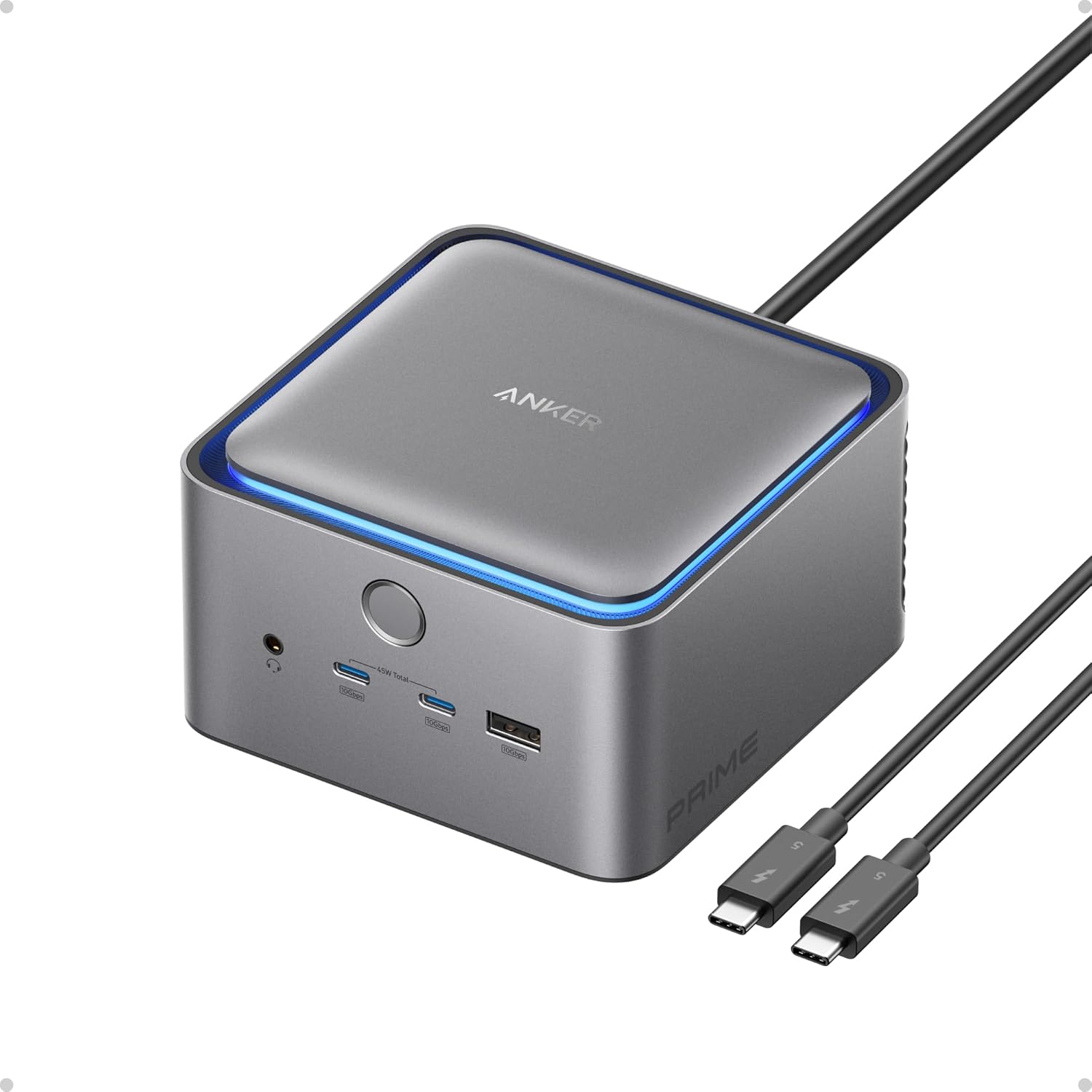
The Anker Prime TB5 Docking Station sports a modern, elegant look that complements any workspace. Its matte surface is both sleek and practical, minimizing fingerprints and dust buildup. When you place this hub on your desk, it not only serves a purpose but also adds a touch of sophistication to your setup.
Dimensions and Weight
Even though it packs a lot of functionality, it remains relatively compact. This means it won’t take up too much valuable real estate on your desk. Carrying it around is also a breeze, thanks to its lightweight design, making it a reliable partner for both home and office setups.

Versatile Connectivity Options
Having multiple connection options is essential for anyone with a variety of devices. The Anker Prime TB5 Docking Station is equipped with 14 ports to cater to your diverse needs.
Detailed Port Breakdown
| Port Type | Quantity | Purpose | Additional Notes |
|---|---|---|---|
| Thunderbolt 5 Upstream Port | 1 | Connects to the host device | Offers up to 120Gbps transfer speed |
| Thunderbolt 5 Downstream Port | 2 | Connect additional Thunderbolt devices | Perfect for daisy-chaining |
| USB-C Ports | 2 | Connect USB-C devices | Fast data transfer |
| USB-A Ports | 3 | Connect legacy USB devices | Very handy for older peripherals |
| SD and TF Card Readers | 1 | Access data from memory cards | Supports multiple formats |
| 2.5Gbps Ethernet Port | 1 | Wired internet connection | Reliable and fast internet access |
| Audio Jack | 1 | Connect audio devices | Supports headphones or speakers |
| HDMI 2.1/DisplayPort 2.1 | 1 | For video output | Supports high-definition displays |
Dual Display Support
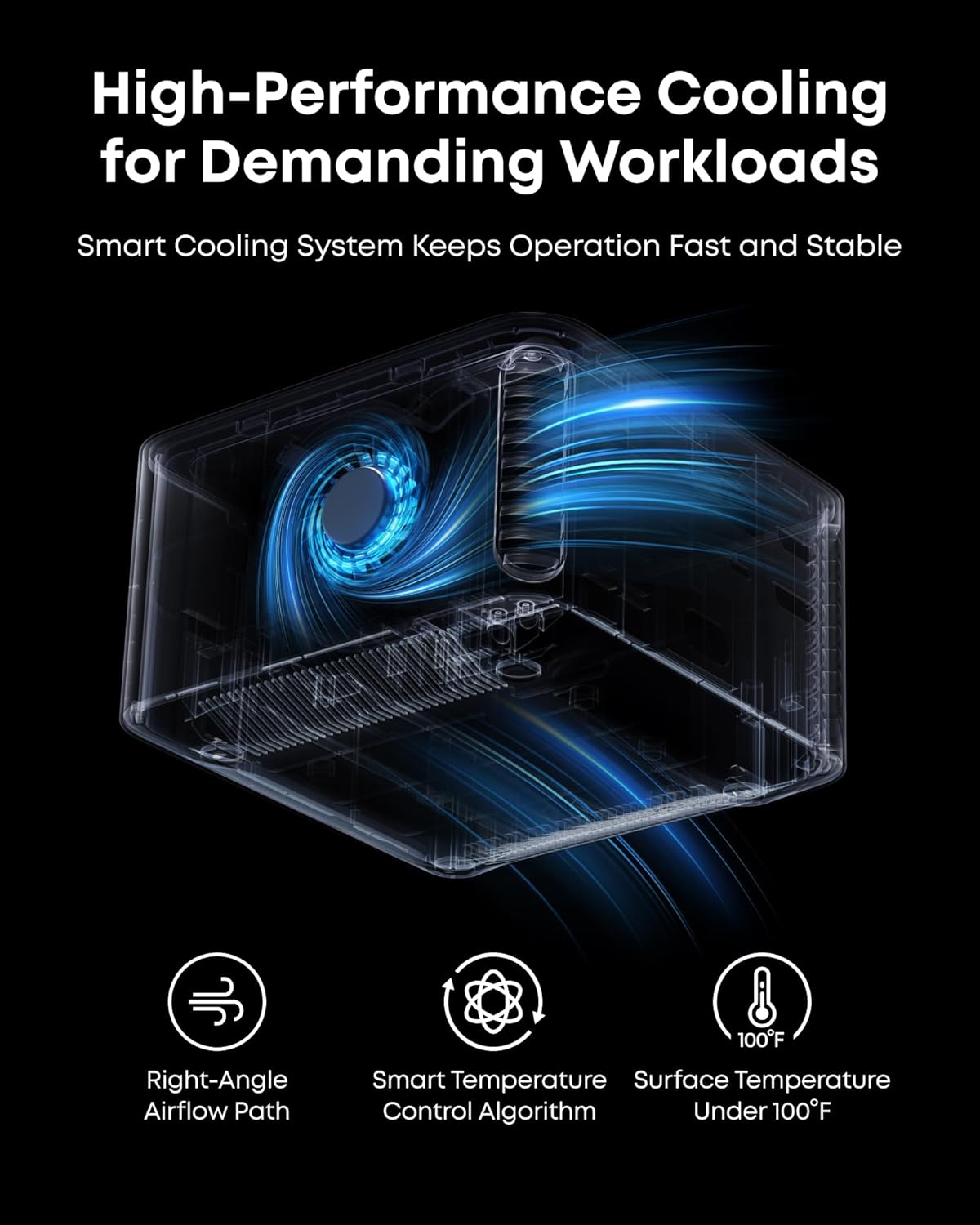
One standout feature of this dock is the ability to support multiple displays. It accommodates one HDMI or DisplayPort as well as two Thunderbolt 5 downstream video outputs. This functionality opens up options for multitasking, whether you’re gaming, streaming, or working.
8K Resolution Capability
Imagine being able to connect to dual 8K displays at 60Hz. This docking station truly allows for a fantastic visual experience, perfect for graphic designers, video editors, or anyone who loves stunning visuals. Note, however, that compatibility can vary for some Windows laptops that only support DisplayPort Alt Mode, as well as MacBooks with M1, M2, or M3 chips.
Lightning-Fast File Transfers
Are you tired of waiting for files to transfer? The Anker Prime TB5 Docking Station changes the game here. Utilizing its Thunderbolt 5 technology, it lets you transfer massive files quickly. Just imagine moving a 150GB file in a mere 25 seconds!
Speed Insights
The speeds you can expect with this dock are a game-changer:
| Operation | Transfer Rate | Time for Large Files |
|---|---|---|
| Normal USB 3.0 | Up to 5 Gbps | Varies with file size |
| Thunderbolt 5 | Up to 120 Gbps | 150GB in 25 seconds |
If you’re working with large files regularly, this dock can significantly cut down on waiting time, letting you focus on what matters: your work.
Efficient Charging
When you are juggling multiple devices, ensuring they are charged can be a hassle. The Anker Prime TB5 Dock simplifies this with a powerful charging capability.
Charging Features
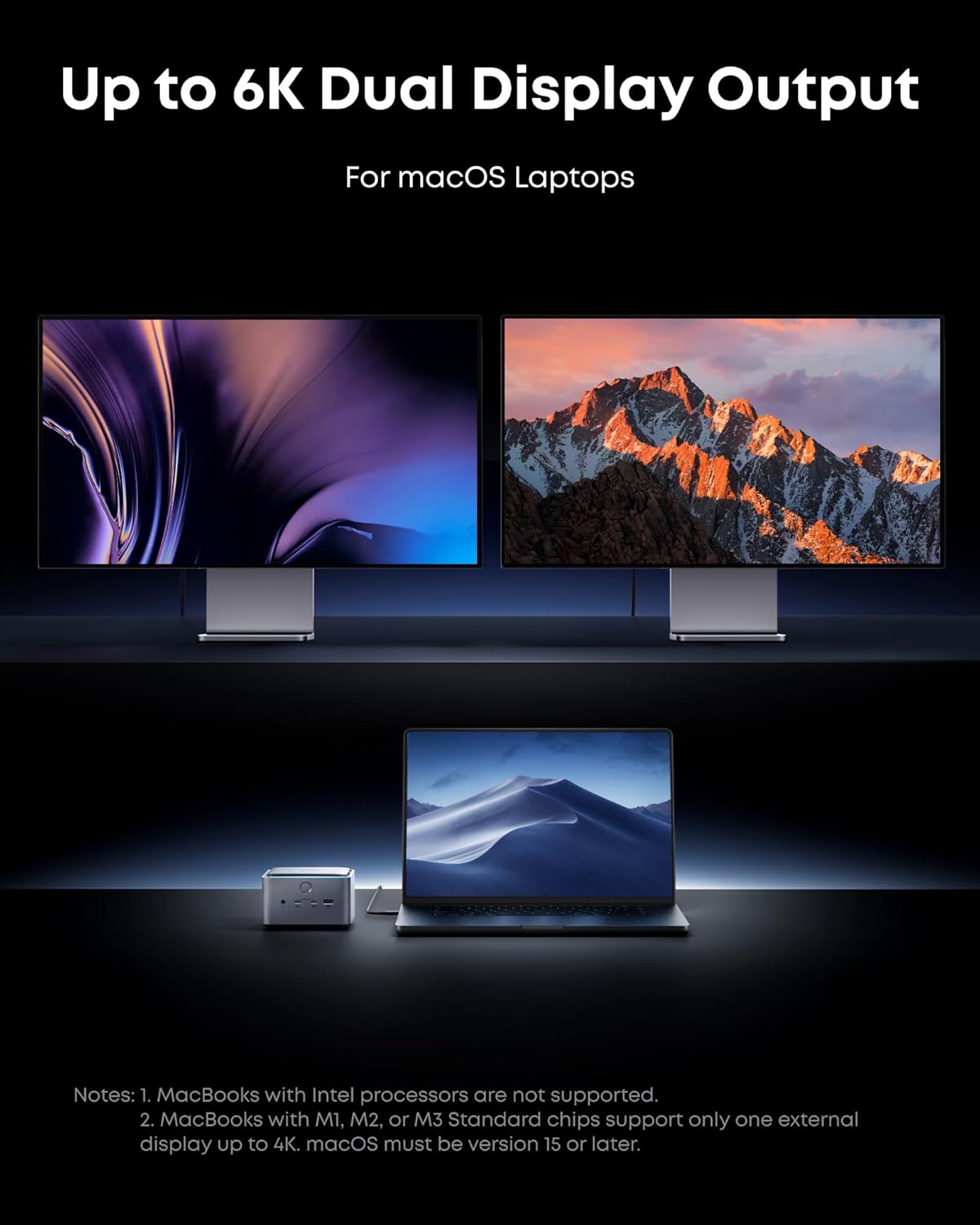
The dock boasts a maximum charging output of 140W through the Thunderbolt 5 upstream port. It supports PD 3.1 protocol to ensure your devices charge quickly and efficiently.
Multi-device Charging
With the front-facing dual USB-C ports, you can share a total of 45W across devices. This means you can charge your laptop and another device simultaneously without compromising on speed.
Advanced Cooling System
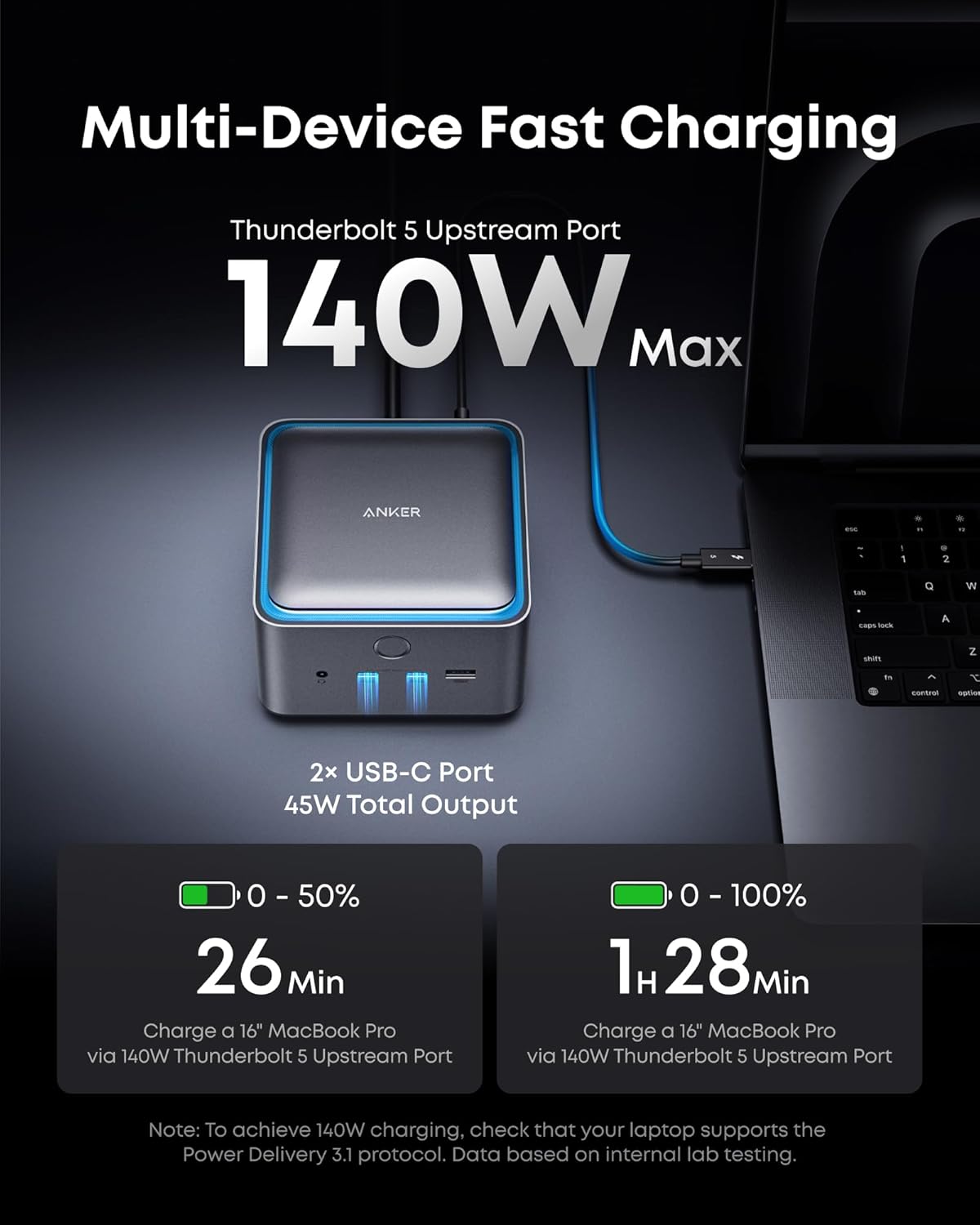
Overheating can be a significant concern when you’re pushing devices to their limits. Fortunately, the Anker Prime TB5 Dock comes equipped with an advanced active cooling system, ensuring optimal performance even under heavy usage.
How It Works
The built-in cooling mechanism kicks in when it detects rising temperatures, preventing overheating and potential throttling. This means you can run your applications, transfer files, and stream videos without worrying about performance drops.
Ambient Lighting
Want to personalize your workspace? The dock features ambient lighting, which can set the mood or simply make your setup feel a bit more unique. You can tweak the colors or even adjust brightness levels, allowing you to sync with your vibe at any given moment.
User Experience
Setting up the Anker Prime TB5 Docking Station is straightforward. Just connect the Thunderbolt cable to your laptop, plug in the power supply, and you’re good to go. The intuitive design means you won’t need a degree in technology to take advantage of all its features.
Compatibility
One of the strongest points of this dock is its compatibility range. It works seamlessly with a variety of devices:
| Device Type | Compatibility |
|---|---|
| Windows Laptops | Supports Thunderbolt 4/5 devices |
| MacBooks | Compatible with M1, M2, M3 chips |
| USB-C Devices | Connect any USB-C peripherals |
| Legacy USB Devices | Use older USB-A devices without issue |
If you have an array of different devices, you’ll appreciate that the Anker Prime TB5 Dock can handle them without any hassle.
Warranty and Customer Service
Anker stands behind its products, offering a 24-month warranty along with responsive customer service. If you run into any issues, the company provides a safety sheet with contact information and access to the user manual via QR code.
User Feedback
Reviewers all across the board are singing praises for the Anker Prime TB5 Dock. Users often highlight its durability, speed, and versatility, making it a go-to choice for anyone needing a robust docking station.
Conclusion
The Anker Prime TB5 Docking Station isn’t just another docking station; it’s a vital tool for anyone serious about productivity and performance. From quick file transfers to supporting multiple displays, it truly caters to the modern user’s needs.
Final Thoughts
You deserve a setup that can keep up with your demands, and the Anker Prime TB5 Dock delivers precisely that. With its combination of speed, charging capabilities, and sleek design, it’s worth considering for your workstation. Whether you’re a gamer, designer, or office worker, this docking station is equipped to elevate your experience.
If you’re contemplating an upgrade to your current setup, this could be the perfect addition. Gorgeous displays, rapid file transfers, and enhanced connectivity are just a few features that await you. Why not simplify your workspace?
Disclosure: As an Amazon Associate, I earn from qualifying purchases.